Work / App Prototype
Scam Shield: a message checker that never says "safe"
Scam Shield is a phone-first web app that checks a suspicious message, link or photo, explains what makes it look convincing, and points you to a contact route taken from a signed directory of organisations. An AI model reads the message, but only plain code decides the risk level.
Demonstration data. Scripted demonstration using invented data.
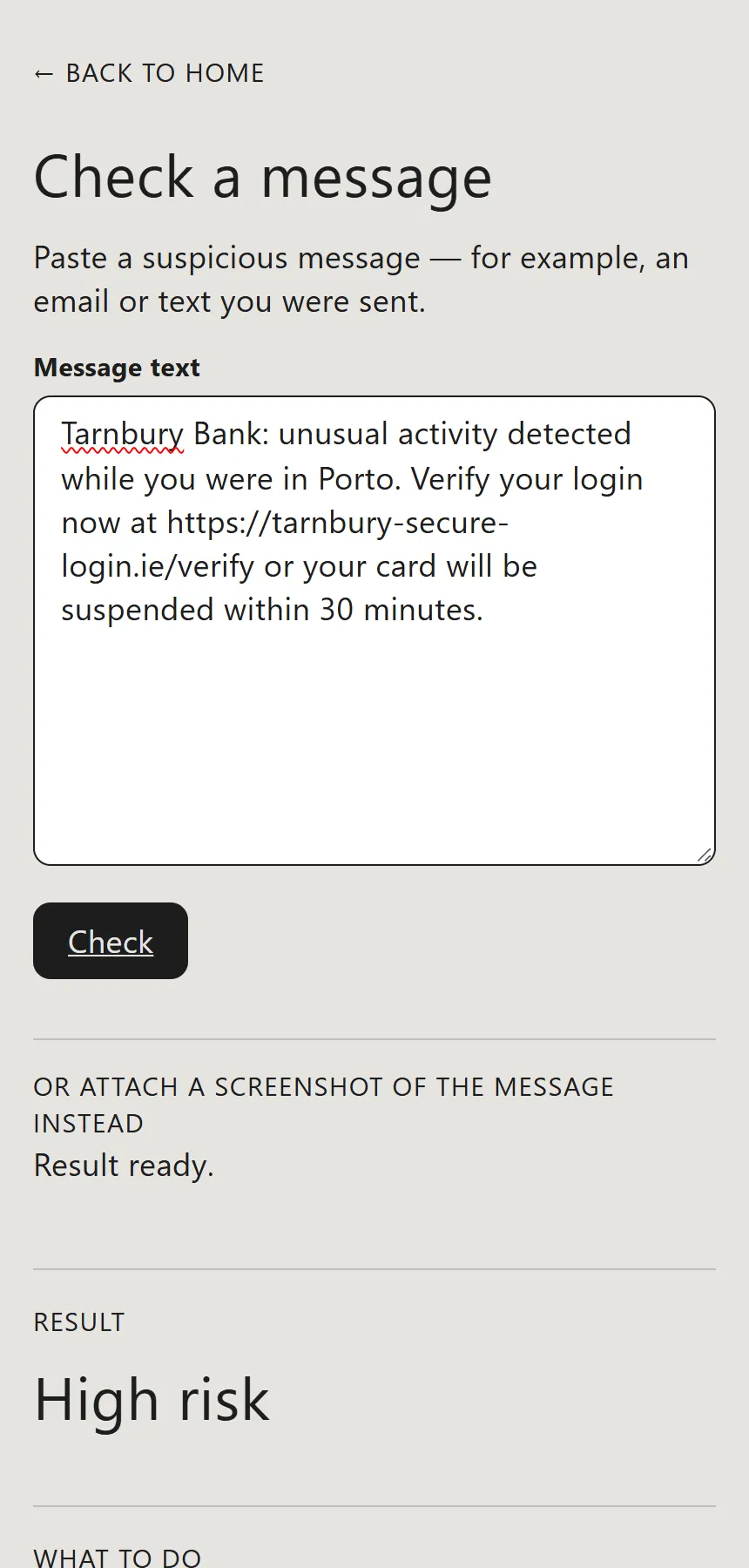
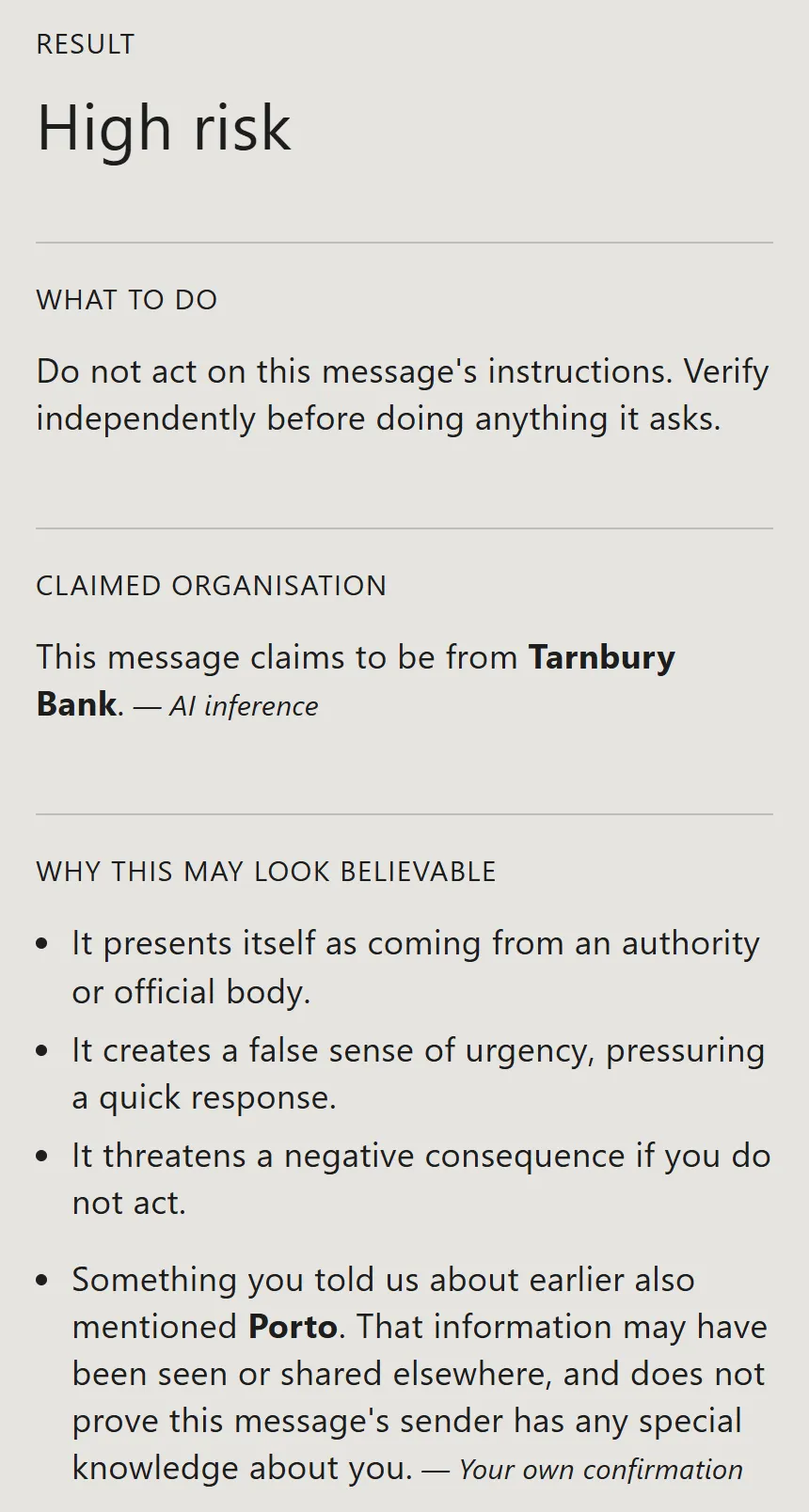
A text arrives from “Tarnbury Bank”. It says there was unusual activity while you were in Porto, and that your card will be suspended in 30 minutes unless you verify your login. You really were in Porto last week. That is what makes it dangerous, and it is the case Scam Shield was designed around: a scammer knowing a true fact about you is not proof that they are your bank.
I paste the text into Scam Shield. It says “High risk”, explains why the message looks believable, and offers a phone number for the bank that comes from a signed directory, not from the message and not from an AI.
At a glance
- Status: Prototype.
- Platform: a progressive web app (a website that installs to the phone’s home screen), built for Android first.
- Stack: React, TypeScript and Vite for the app, Cloudflare Pages Functions for the server side, Postgres for the directory.
- Built with: Claude Code.
- AI inside the product: yes. Claude Haiku 4.5 classifies the text of a message. It does not set the risk level and it cannot supply contact details.
A message, checked
Text version of the video
- The home screen offers Check a message, Check a link and Check a photo, then four quieter options for exposure history, trusted organisations, the verified directory and settings.
- I open Check a message and type an invented text from "Tarnbury Bank" that mentions Porto and contains a link.
- The result reads High risk, with the advice not to act on the message, the organisation it claims to be from, and why it looks believable.
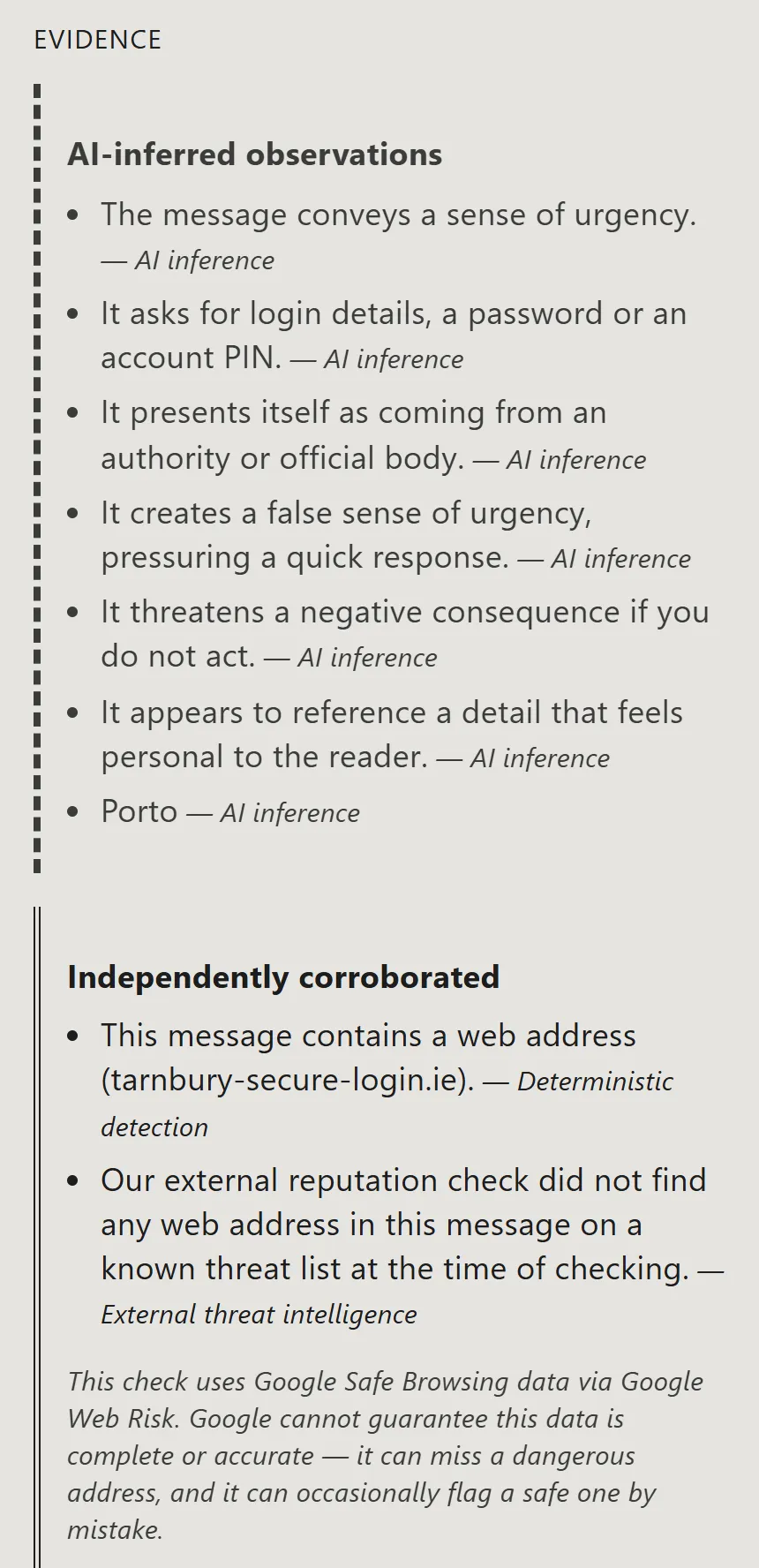
- Further down, the evidence is split into AI-inferred observations and independently corroborated ones. The app then asks whether Tarnbury Bank is the organisation I want to verify.
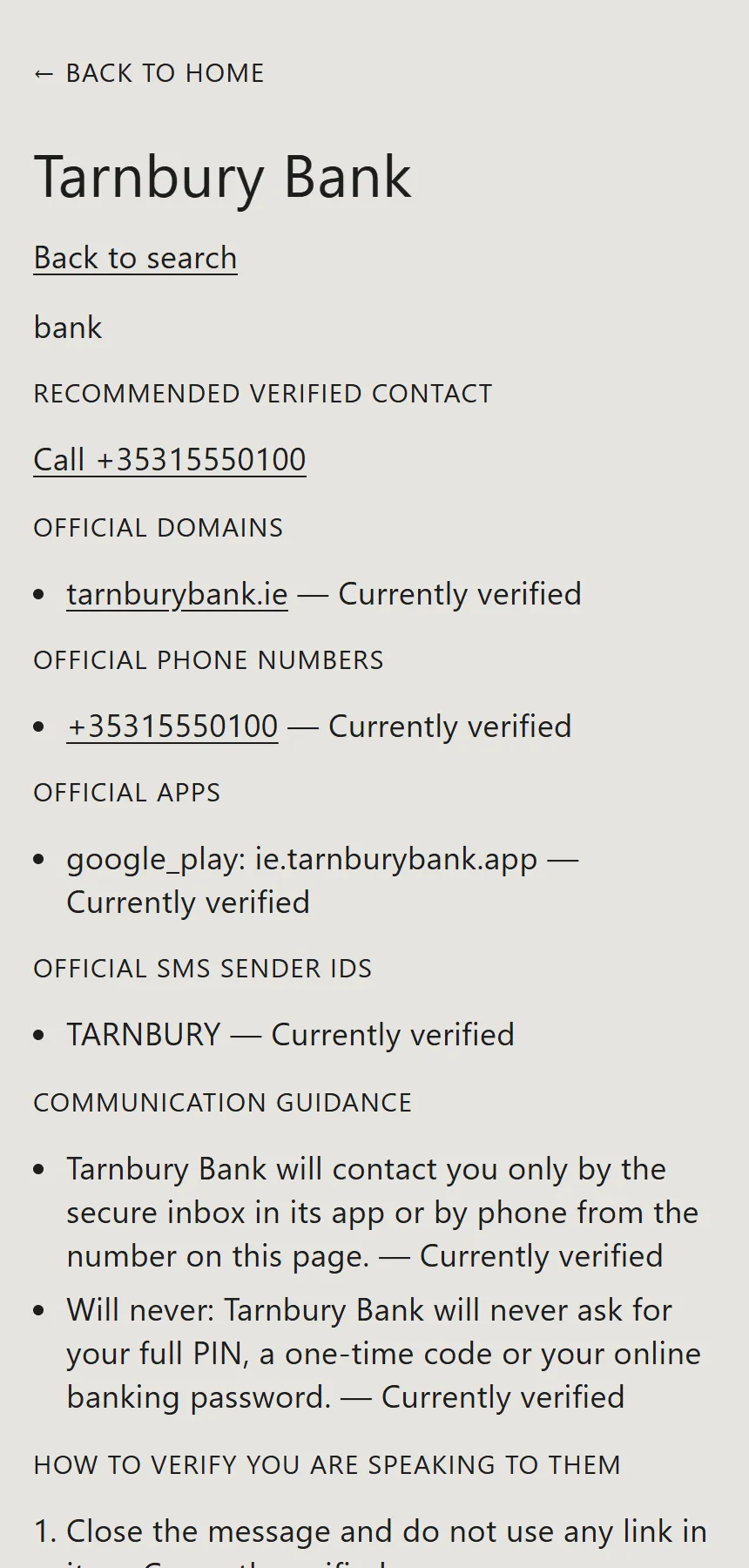
- I confirm, and a verified contact route appears. I open the full directory entry: official domain, phone number, app, SMS sender name, what the bank says it will never ask for, and the steps to check you are really speaking to them.
The usual scam advice, such as looking for spelling mistakes, fails against a message that is well written and contains true detail. A location, an employer or a recent purchase can all be gathered from public posts and photos. So the question Scam Shield answers is not only “does this look wrong?” but “what does this claim, what makes it persuasive, and how do I reach the real organisation without using anything in the message?”
What it does
Check a message. Paste a text or email, or attach a screenshot, which is read on the device. The result has a plain level (High risk, Low concern and so on), advice, the claimed organisation, why it may look believable and the evidence behind all of it. The evidence is labelled by where it came from.
Verified route. The claimed organisation is only a claim. The app asks me to confirm it, then looks the organisation up in the directory.
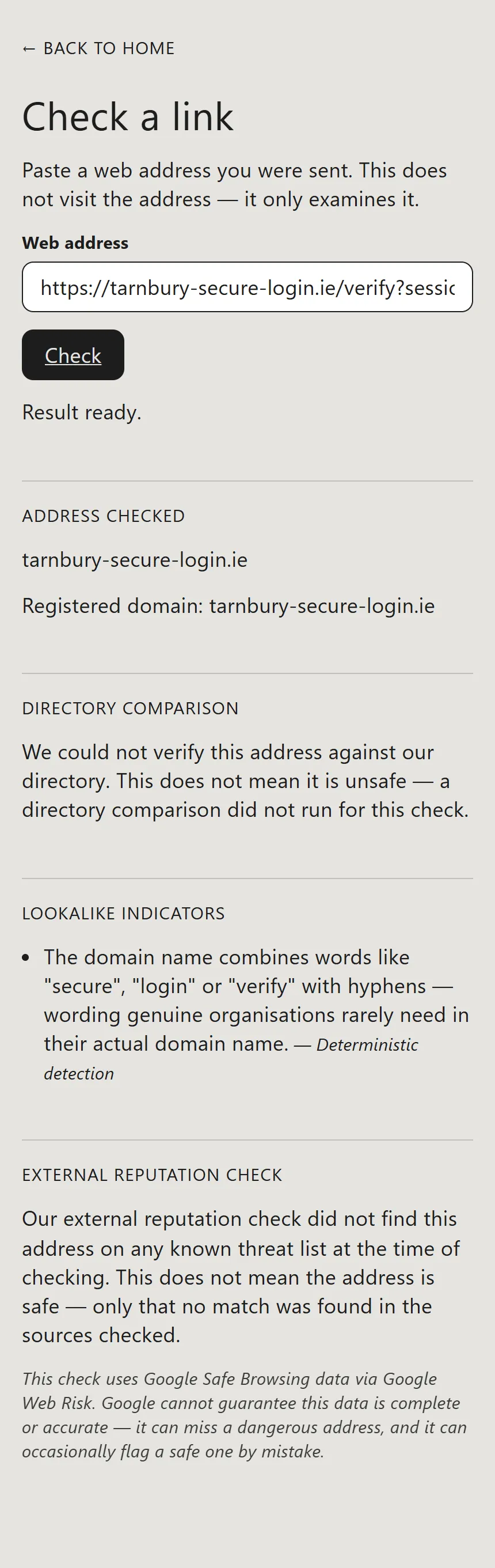
Check a link. Paste a web address and the app examines it without visiting it: the registered domain, lookalike indicators and a known-threat lookup.
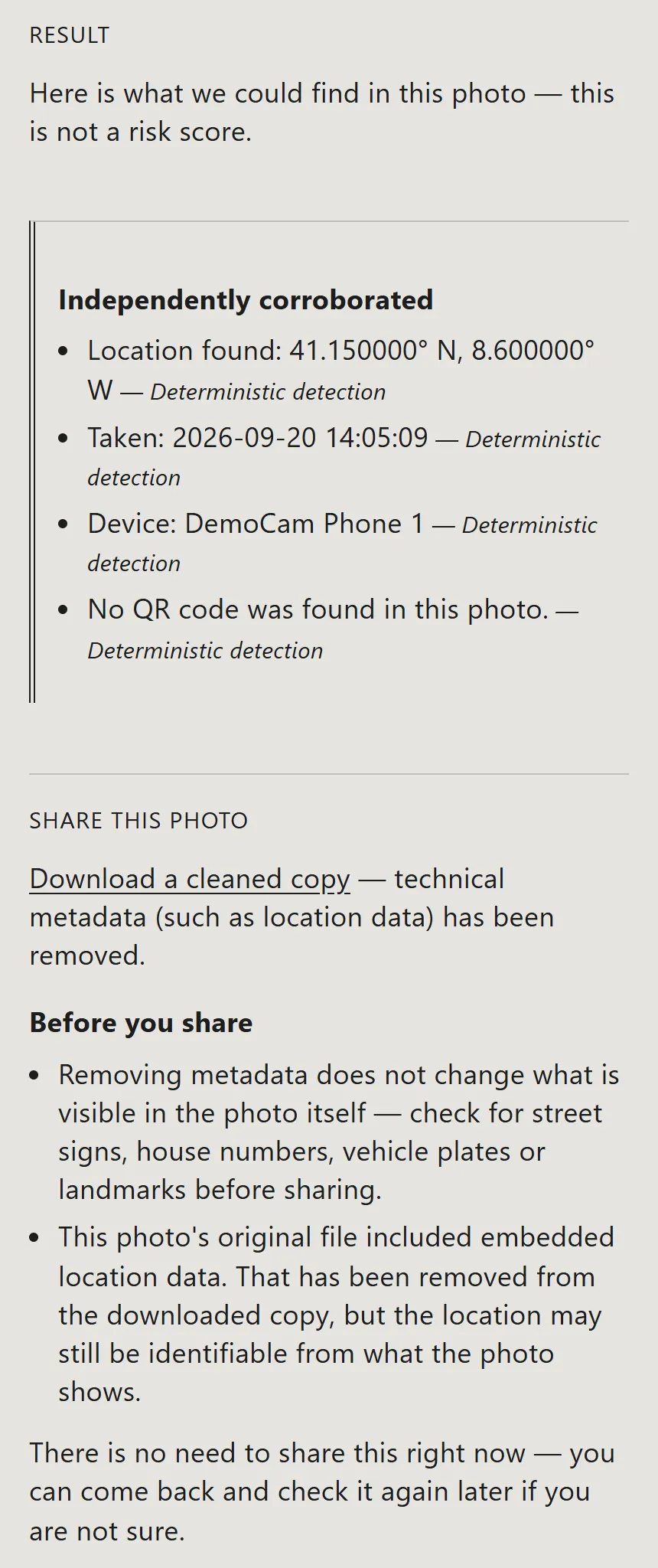
Check a photo. Before you post a photo, the app shows what it carries.
Keeping the AI away from trust
The easy design asks a language model “is this a scam, and who should I call?” I rejected it: a model can be talked into things by the very message it is reading, and an invented phone number in a scam checker is worse than no checker. The rules in the project’s governing file are blunt: AI may classify or explain evidence, it may not establish a verified fact, and the final level must come from deterministic code.
Build decision. The AI proposes a name; it never unlocks a record. The model’s tool has no field for an organisation identifier, and the code forces that value to empty whatever the model returns. A claimed name is matched against the directory by plain search. Even a perfect match stays “ambiguous” until the message gives independent corroboration, such as a domain that belongs to that organisation, or I confirm the organisation myself. In this message the domain is a lookalike, so the binding stays ambiguous until I press the button.
An attacker can name any real bank, so a model’s guess that “this is Tarnbury Bank” cannot be allowed to display Tarnbury Bank’s contact details. Here is what the code receives and returns for the invented message:
model: claude-haiku-4-5-20251001, one tool, forced: report_analysis
user turn:
  <message>
  Tarnbury Bank: unusual activity detected while you were in Porto. ...
  </message>

risk engine: level high
  REQUEST_CREDENTIAL, MANIPULATION_AUTHORITY, MANIPULATION_URGENCY,
  MANIPULATION_THREAT, CRITICAL_CREDENTIAL_REQUEST_UNVERIFIED_IDENTITY
organisation binding: ambiguous (BINDING_UNCORROBORATED)
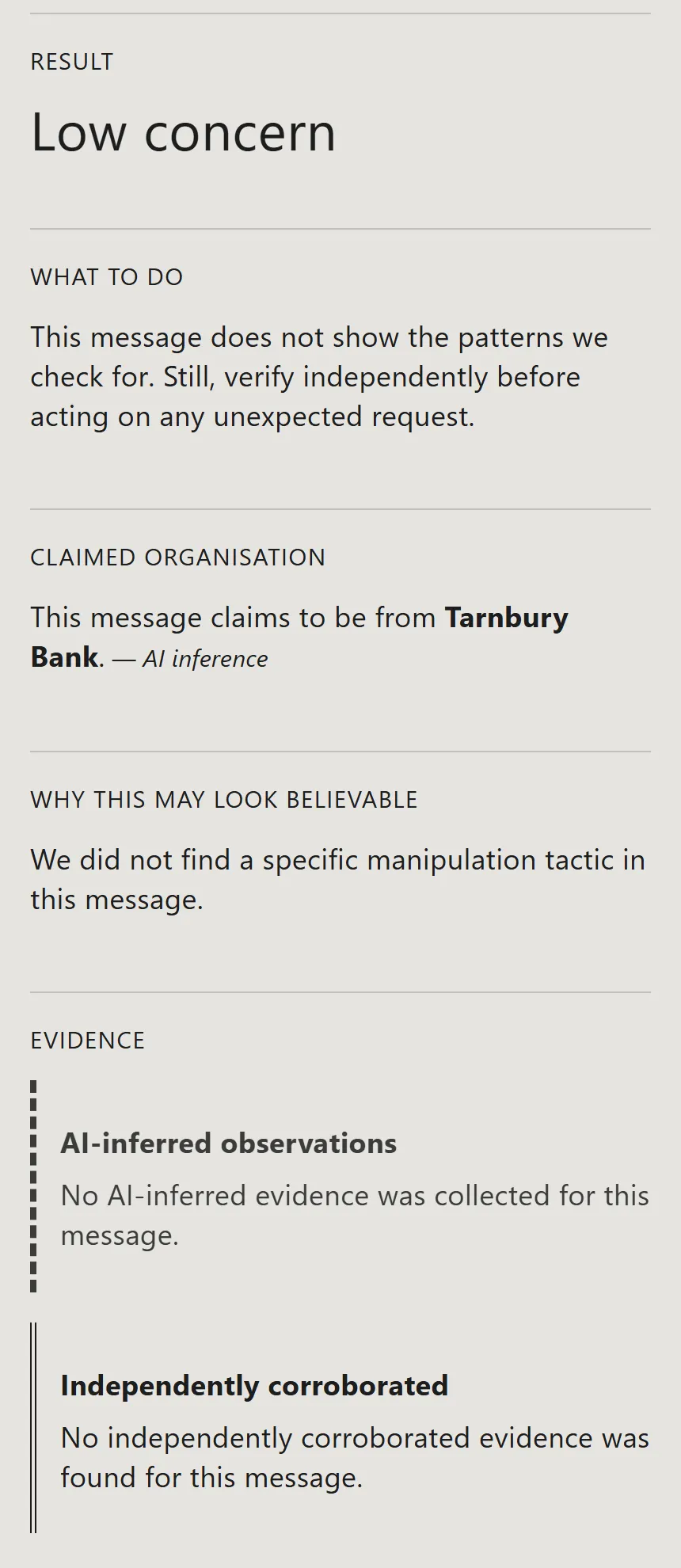
The risk engine is a function with versioned rules and a reason code for every contribution. It makes no AI call and no network call. Each piece of evidence is “detected”, “not detected” or “not assessed”, and an unassessed item can never count in a message’s favour. The lowest level is “Low concern”, and it comes with advice to verify anyway.
Two more decisions follow the same logic. Directory records are signed, and the phone verifies the signature chain itself rather than trusting the server. The public key it checks against is compiled into the app. And exposure history, the list of facts earlier checks found about me, is switched off by default and stored in the browser’s own database. By design it is never sent to the server.
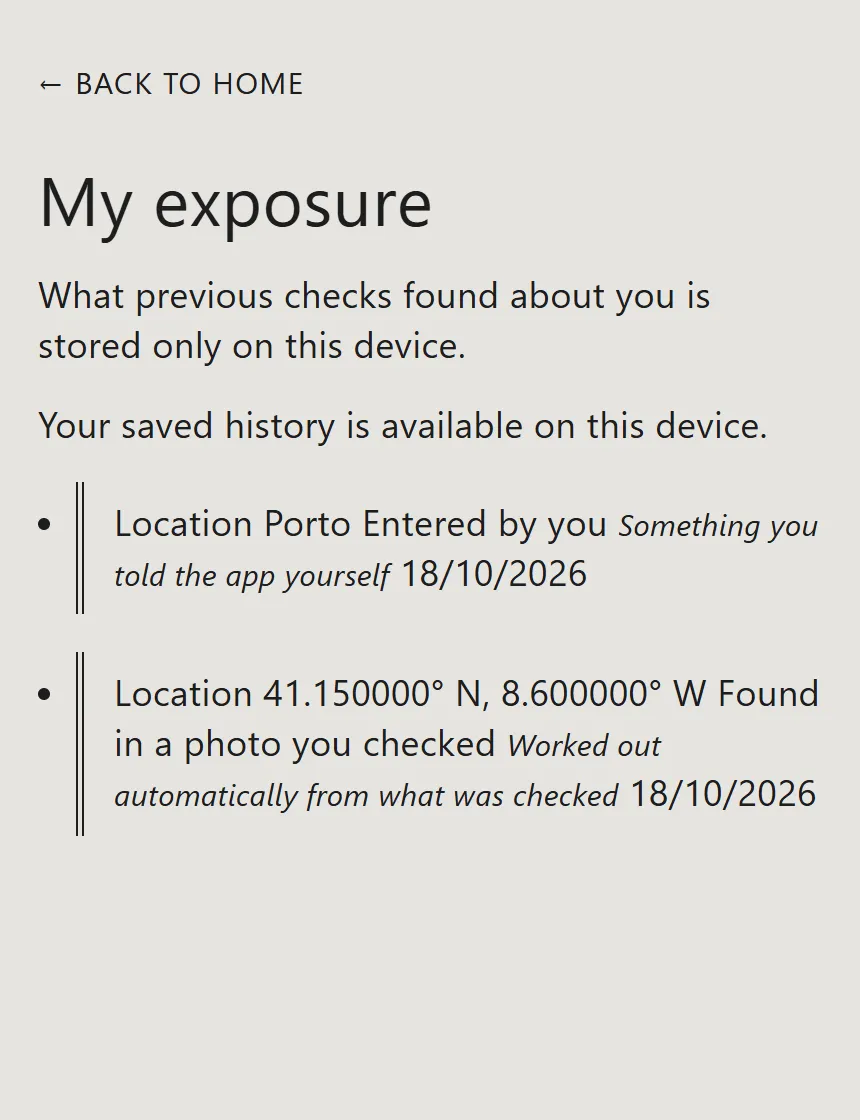
Exposure history and the Porto match
With history switched on, the app can compare a new message with what earlier checks found. The photo in Figure 5 gave coordinates and nothing else, so it cannot, by itself, match the word “Porto” in a text.
Under the hood
I built Scam Shield with Claude Code as a progressive web app in React and TypeScript, with Cloudflare Pages Functions on the server side. Each architecture choice is recorded as a numbered decision.
| Layer | What I used |
|---|---|
| Interface | React, TypeScript and Vite, a progressive web app built for Android first |
| Server side | Cloudflare Pages Functions, wrapping a framework-independent core module so a future native client can reuse it |
| Data | Postgres for the signed directory; exposure history in the browser’s own database, never sent to the server |
| Integrations | A threat-list lookup and the signed directory service |
| Runtime AI | Claude Haiku 4.5 through a single forced tool, classifying message text only |
| Trust decisions | A deterministic risk engine with versioned rules and reason codes; signature verification on the phone |
| Hosting | Cloudflare Pages |
| Tests | 604 tests across 41 test files |
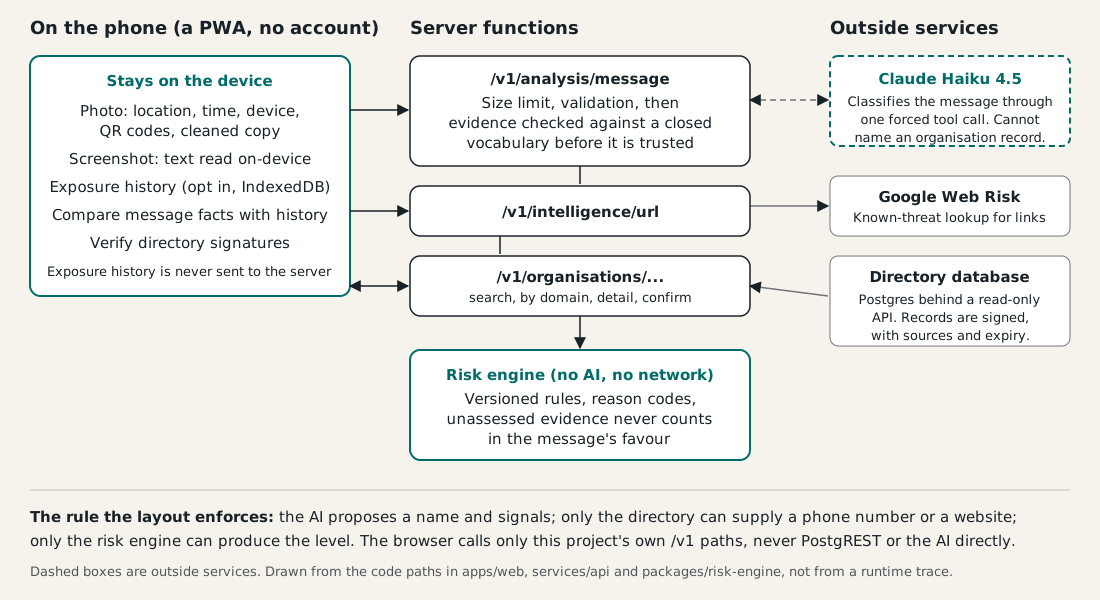
The project keeps 26 numbered decision records and a task list of about 135 entries, of which 118 are marked complete. The repository holds 345 commits.
What it shows
The most useful rule in the whole design is the simplest: the AI may read, but it may not decide. A model proposes a name, code decides the level, and a signed directory, not a message, supplies the phone number. That split lets Scam Shield stay useful on messages that are well written and true in their details, because nothing the message says can talk the app into trusting it.