Work / Agent Prototype
Ireland Open Data Analyst: a daily briefing built from open government data
Ireland Open Data Analyst picks a live dataset from data.gov.ie, profiles it in code, then has Claude write a short plain-English briefing and a second Claude call fact-check every number. Charts are chosen by code, not by the AI. It publishes a static report site on a daily schedule.
“86% of Irish bathing sites achieved excellent water quality in 2025, with Mayo accounting for 28% of all monitored beaches.” A pipeline wrote that headline from a live dataset on data.gov.ie, and every figure behind it comes from numbers computed in code. Irish public bodies publish a lot of live data and almost nobody reads it. I wanted to see how far a pipeline could get on its own: find a dataset, work out what is interesting in it, write it up for an intelligent non-statistician and publish the result without me in the loop. That is Ireland Open Data Analyst.
At a glance
- Status: prototype.
- Built: 9 and 10 August 2026, seven commits, with a few later notes recorded in the project’s status files.
- Platform: a Python pipeline that publishes a static website on GitHub Pages.
- Stack: Python, pandas, httpx, Jinja2, SQLite, Observable Plot for charts, GitHub Actions, and a small Cloudflare Worker.
- Built with: Claude Code.
- AI inside the product: yes. Claude, through the Anthropic API, drafts the narrative, fact-checks it, and optionally adds web-searched context.
The published site
Text version of the video
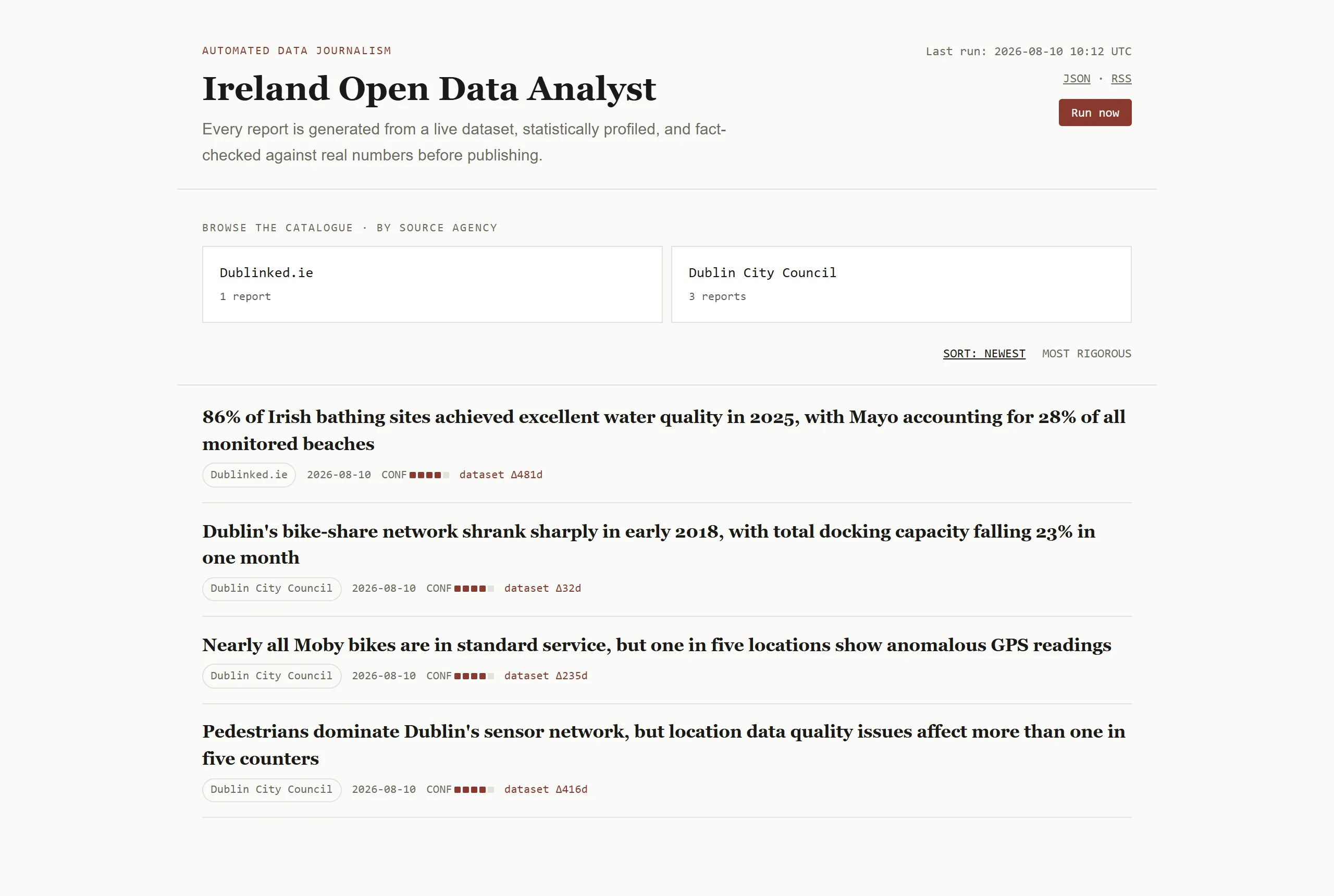
- The archive lists four generated reports with source agency, date, a confidence indicator and dataset age. A "Run now" button sits top right.
- The bathing water report opens with a finding-style headline, a "Why this matters" note with linked news coverage, and bullet observations.
- Scrolling shows ranked charts, an explicit caveat and a collapsed "Source and method" panel.
- The "Source and method" panel opens to show the dataset page, the API endpoint, the licence, the automatic selection score and the publication time.
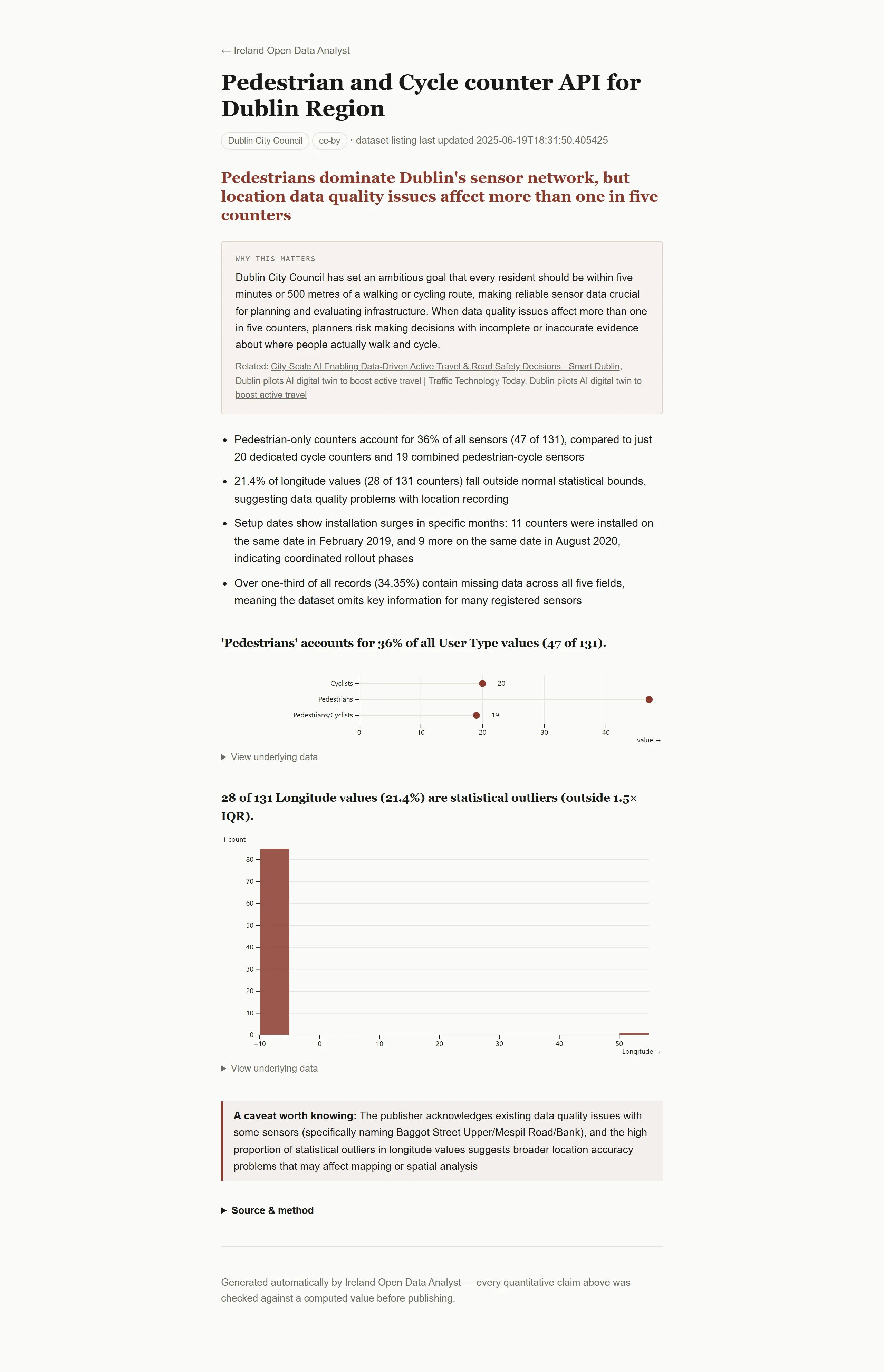
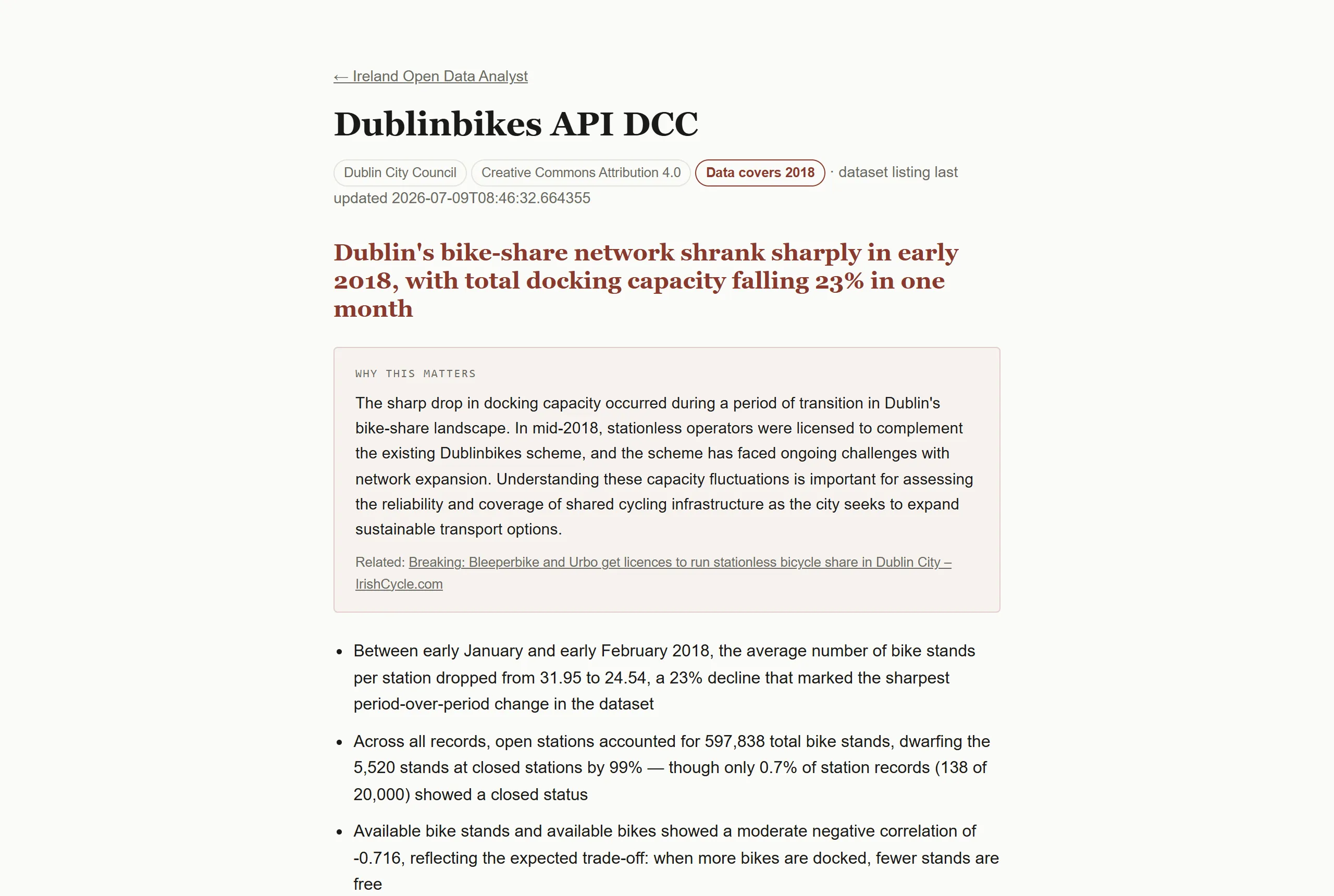
- Back on the archive, the pedestrian and cycle counter report opens with its headline, context note and first observations.
Open data portals are built for people who already know what they are looking for. data.gov.ie lists thousands of datasets, and a visitor who does not know what to ask gets a catalogue, not an answer. This tool works in the opposite direction: the system chooses a dataset, finds the story in it, and says so in a sentence. An AI will happily write a fluent paragraph around a number it has made up, so the design question was not “can Claude write about data” but “how do I stop it saying anything the data does not support”.
What a report contains
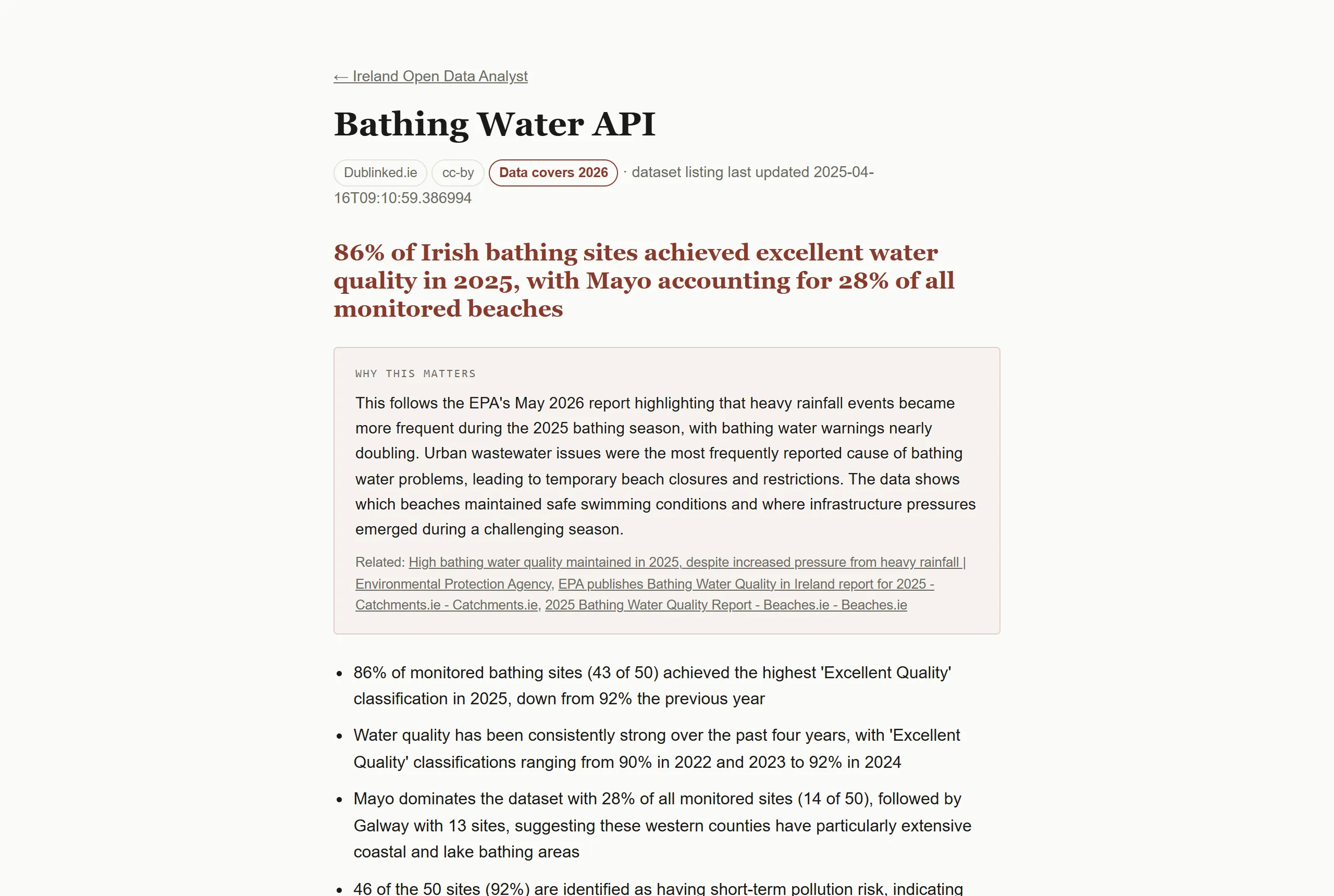
Each report has a headline, a short context note, three to five observations, up to three charts, an explicit caveat and a collapsible method panel that links back to the source dataset, the exact API endpoint and the licence. Field names are translated into plain English, so a column called county_name becomes “county” and the reader never sees the database.
Giving the AI only the judgement
I split the work so that the AI does only the part that needs judgement.
First, code does the analysis. A profiling step computes statistics for every column. An insight engine then ranks what is interesting: the biggest change over time, how concentrated a category is, strong correlations and outliers. The AI does not summarise raw rows. It sees a computed profile and a ranked list of insights, and its instructions say to treat every number in them as ground truth.
Build decision. Claude drafts the narrative from the profile and the ranked insights, but the first one is only a suggestion. It can choose a lower-ranked insight if that makes a better story, and it is told to say plainly when the data is dull. The editorial call is the AI’s. The numbers are not.
Second, a separate Claude call acts as fact-checker. It receives the draft, the profile and the insights, and returns a verdict for every sentence: pass, corrected with the true value, or strip. A stripped sentence is removed outright; the pipeline never publishes an open flag. If every observation is stripped, the run fails instead of publishing an empty report.
Build decision. The original design had a third AI pass that proposed which chart fields to plot. It produced charts bound to columns that did not exist. I replaced it with a small piece of ordinary code that maps each kind of insight to a chart type and binds the real dataframe columns directly. A wrong field name is now impossible, not merely unlikely, and the AI’s job shrank to deciding which insight is the story.
Where the context note comes from
The “Why this matters” box is the one place the pipeline looks outside the dataset. A third call uses Claude’s web search tool to find recent Irish coverage connected to the finding and writes a note of under 60 words with up to three links.
Build decision. The fact-check covers claims about the dataset, so the note is handled differently: the prompt forbids invented numbers, tells the model to write more generally when nothing relevant turns up, and the page shows the source links. If the search fails, the report publishes without the box.
Inside the system
I wrote two specifications first, one for the system and one for presentation and storytelling rules, then built the pipeline against them with Claude Code as a Python application that publishes a static site. The project keeps three decision records. The decisions that mattered were removing the AI chart pass, moving from Netlify to GitHub Pages, and committing the SQLite database and generated reports back to the repository so the archive accumulates across runs.
| Layer | What I used |
|---|---|
| Pipeline | Python, pandas, httpx |
| Discovery and connectors | Candidate pool of live-API datasets, with connectors for DataStore, PxStat, ArcGIS and generic JSON |
| Storage | SQLite, committed with the generated reports so the archive grows run by run |
| Rendering | Jinja2 templates and Observable Plot charts, published as a static site |
| Runtime AI | Claude through the Anthropic API: draft, fact-check and optional web-searched context |
| Scheduling | GitHub Actions on a daily schedule, committing the generated site |
| Hosting | GitHub Pages, plus a small Cloudflare Worker behind the “Run now” button |
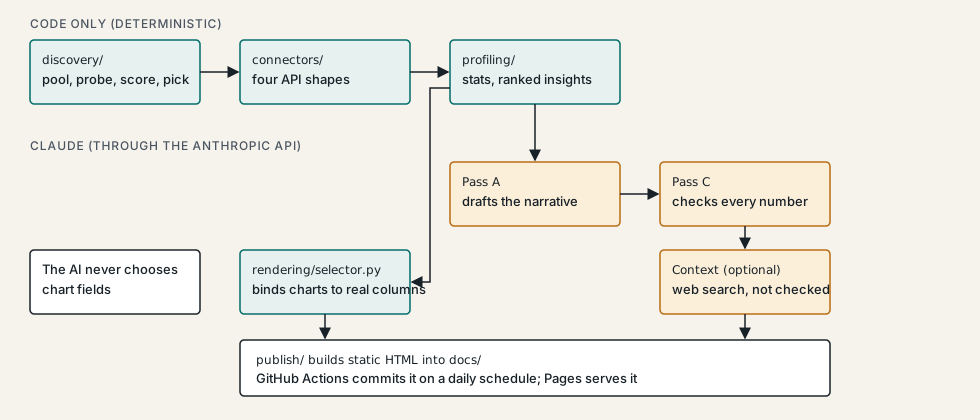
Discovery keeps a candidate pool of datasets that expose a live API, probes each one, and scores it on whether it has a time dimension, numeric fields and categories. It then picks one by weighted random choice, excluding datasets published in the last 30 days. A failure on one candidate is logged and rerolled once, so a bad dataset cannot crash a run.
A GitHub Actions workflow runs the whole thing on a daily schedule and commits the generated site. The API key is a repository secret available to the run step only. The Cloudflare Worker holds the GitHub token as a Worker secret and allows one trigger per 15 minutes, for everyone together.
What it shows
The most useful move was shrinking the AI’s job. Every time I let the model choose something that code could choose, a bug followed. The chart field problem is the clear example, but the same logic applies to the numbers: computing them in code and asking the AI only for editorial judgement made the fact-check a tractable task instead of an open-ended one. The live site is at geraco.github.io/GovDataIRL.