Work / App Production
Gerfit: a gym app that plans my next session
Gerfit is a workout tracker built with Claude Code. Describe a session in plain English and Claude drafts it from your own history, works around a sore shoulder or back, summarises whole gym visits and plans next week. Built June to October 2026.
Demonstration data. Invented data.
Type “shoulder’s sore, swap the overhead pressing” on a routine in Gerfit and it rewrites the session around the shoulder, keeps the exercises that still fit and tells you what it changed and why. I built Gerfit with Claude Code between June and October 2026. What sets it apart is that the AI plans from my own data: what I lifted last week, which muscles I have neglected, what equipment my gym has and what currently hurts.
At a glance
- Status: production. Live on Cloudflare Pages, with the AI features switched on for my account.
- Built: 14 June to 10 October 2026, 97 commits.
- Platform: mobile-first web app, installable on a phone’s home screen.
- Stack: React 19, Vite, TypeScript, Tailwind v4, Supabase (sign-in, Postgres with row level security, serverless functions).
- Built with: Claude Code.
- AI inside the product: yes. Claude, through seven server-side functions, builds and edits routines, plans weeks, summarises gym visits, reviews training periods, gives second opinions on routines and adds exercises from a photo or a name.
A session, start to finish
Text version of the video
- The home dashboard, then Routines, then the Push Day routine with its four exercises.
- Start workout: choose 60 minutes and a readiness score of 3.
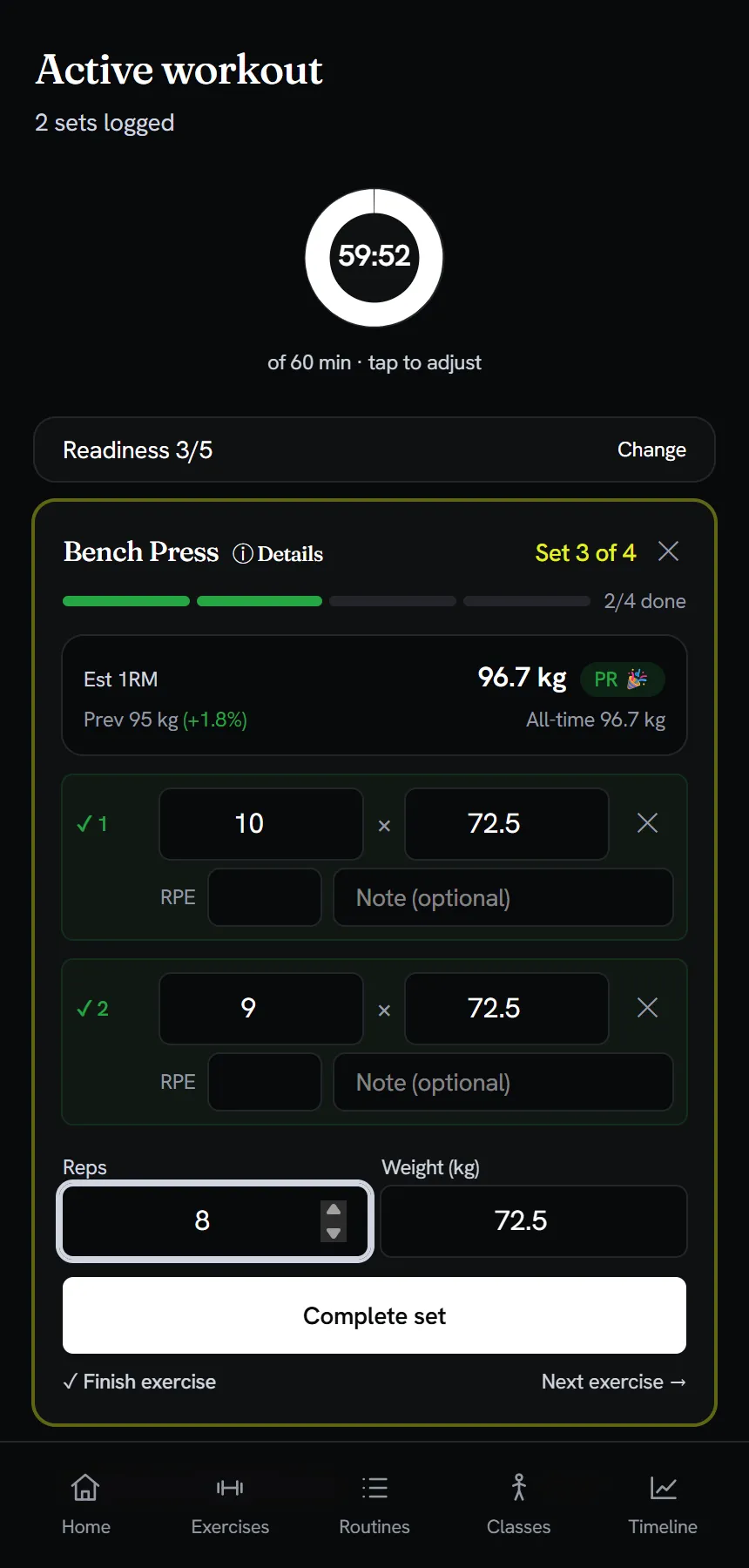
- Log bench press at 72.5 kg for 10, 9 and 8 reps. After the first set the estimated one-rep max (96.7 kg) and a PR badge appear, and a rest timer starts.
- Finish the exercise and complete the workout. The session detail page shows three sets and 1,958 kg of volume.
- The timeline shows the session at the top of the list. The statistics page scrolls through volume per workout, best weight and estimated one-rep max per exercise.
Logging is quick on a phone: a set takes seconds, the rest timer starts itself and the one-rep max matches the Epley formula (72.5 kg for 10 reps gives 96.7 kg). Every tracker logs sets, though. What I wanted was a planner that knows me, so most of Gerfit is the part around the logging.
Describe the session you want
The routine builder is a text box. You describe the session and Claude builds it from your own exercise library and recent history. Because it is only a text box, I can dictate the request with my phone keyboard’s microphone. Here I asked for a 45-minute upper body day with dumbbells and machines, easy on a right shoulder.
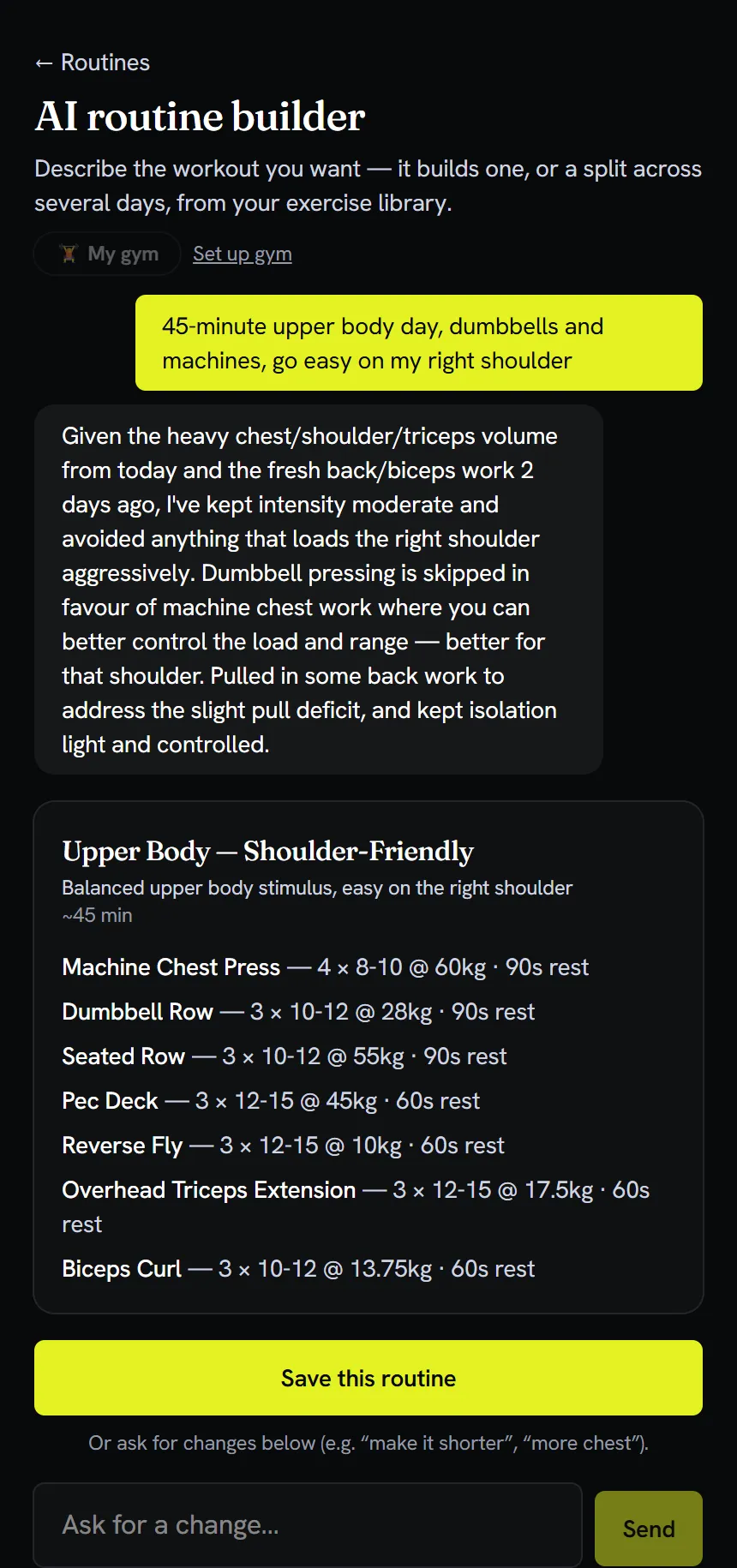
That reply is built from my data, not a template. I can keep talking to it (“make it 35 minutes”), and if a request needs more than one day it returns a split of up to four routines that I save in one tap. Nothing is saved until I press the button.
Text version of the video
- Open the AI routine builder and type: "45-minute upper body day, dumbbells and machines, go easy on my right shoulder". A "Thinking" message shows while Claude works.
- After about 16 seconds a routine appears with a short explanation. I ask for "make it 35 minutes" and a revised routine arrives.
- Open the Push Day routine, choose Update with AI and type "shoulder's sore, swap the overhead pressing and keep it to 40 minutes".
- A revised routine arrives with the reason for each change. I press Discard and the routine stays as it was.
It works around what hurts
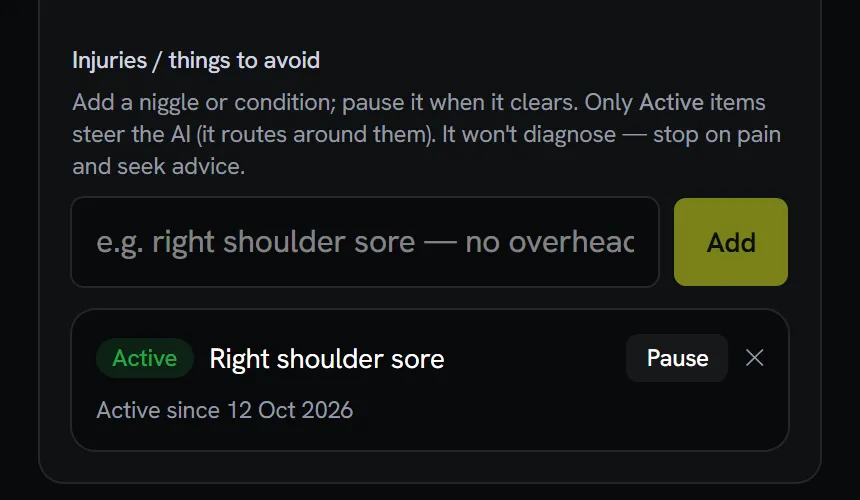
Injuries live in a managed list in Settings. I switch an item on when it flares and off when it settles, and the app keeps the history. Every active item goes to the AI with every request, so it swaps in a safer movement that trains the same muscle and says it did. The timeline marks the days a flare was active, so I can see what it did to my training.
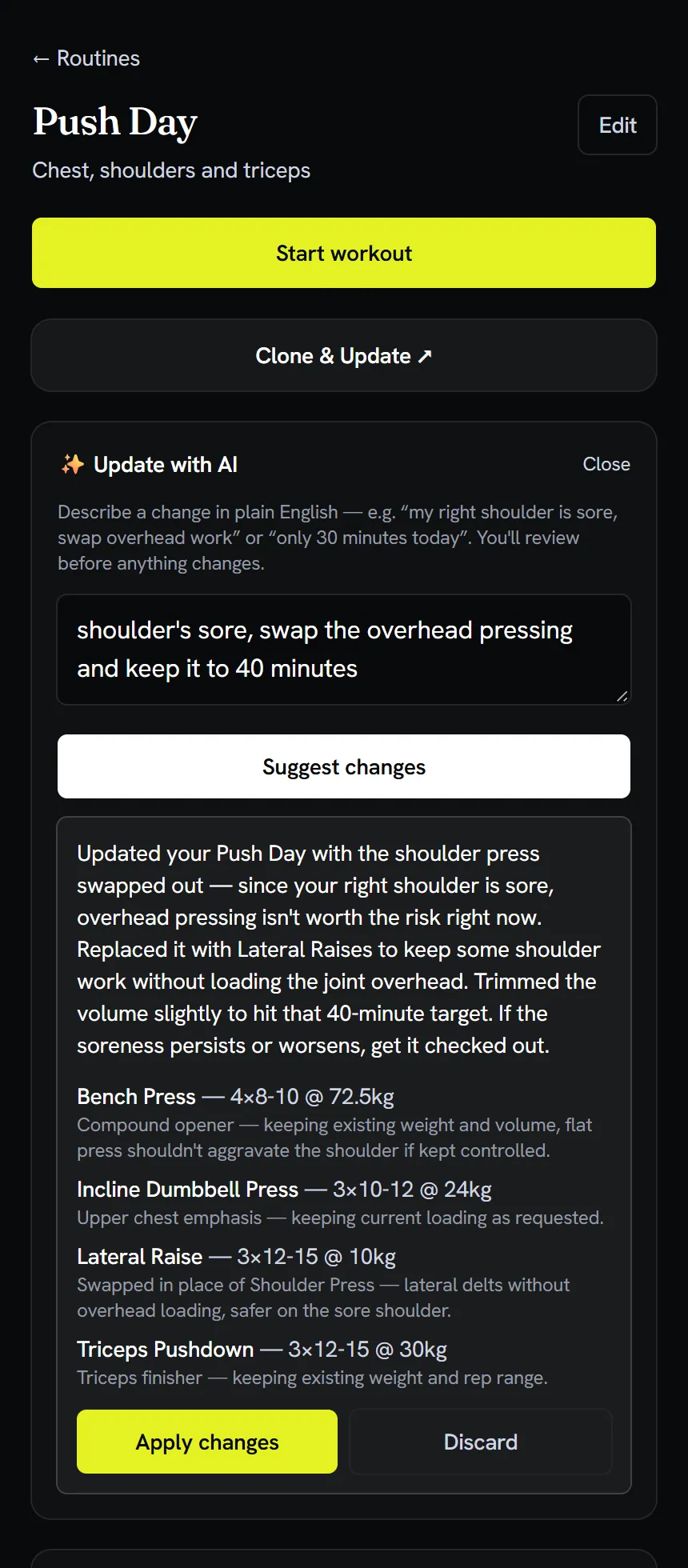
The same flag steers editing. On any routine I can type something like “shoulder’s sore, swap the overhead pressing and keep it to 40 minutes”. It returns a complete revised routine, explains each change and tells me to get it checked if the soreness persists. Its instructions tell it not to diagnose. Nothing changes until I press Apply.
It sees the whole gym visit
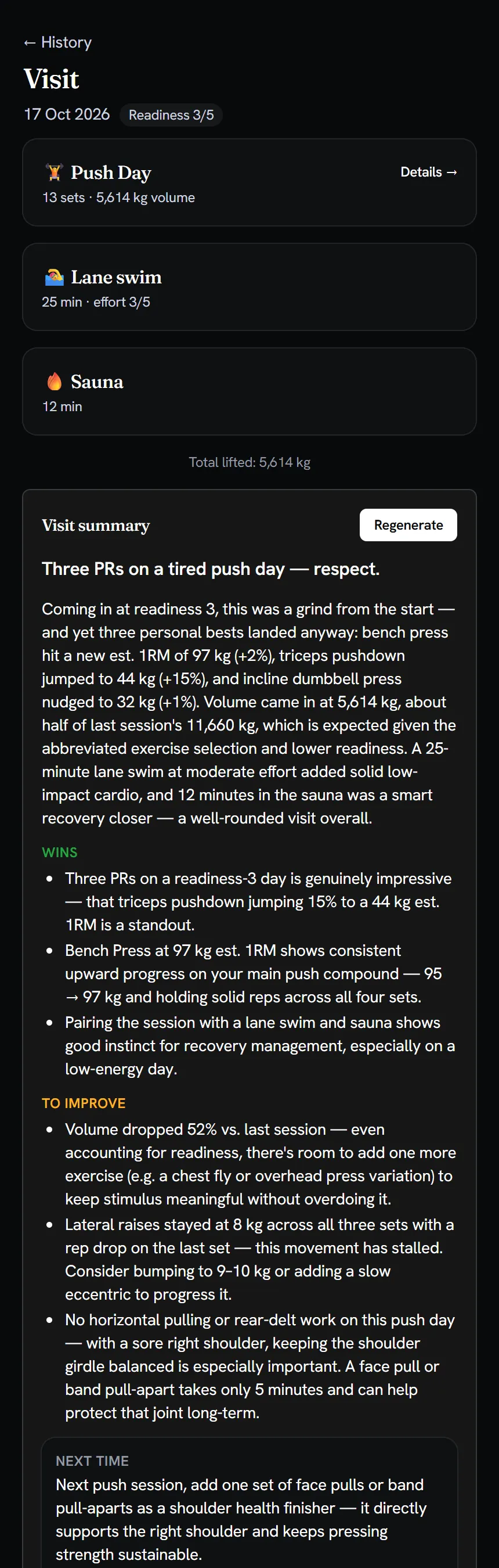
A visit is a calendar day, so a lifting session, a swim, a sauna and a yoga class land together. One tap gives a recap with a headline, wins, what to improve and a next step. It cites real numbers: new personal records, the change in estimated one-rep max against last time, volume against the previous workout day, and how fresh I said I felt.
It reviews my week and plans the next
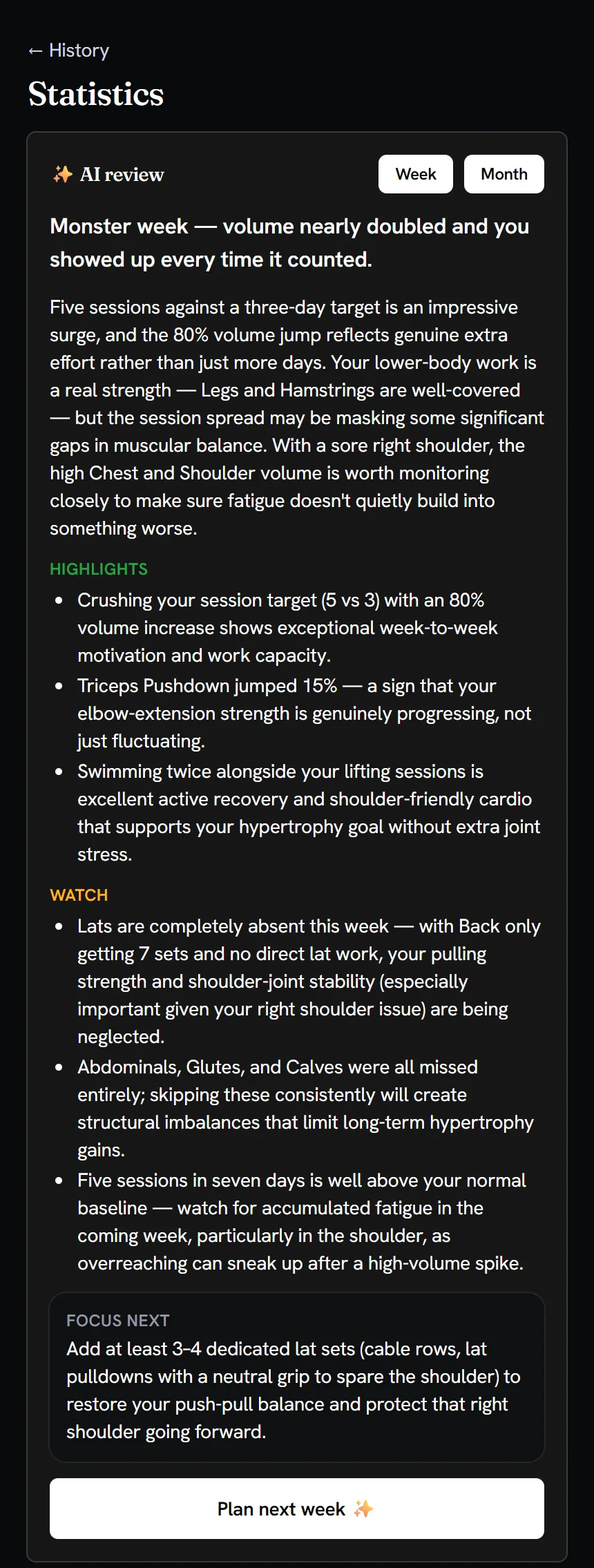
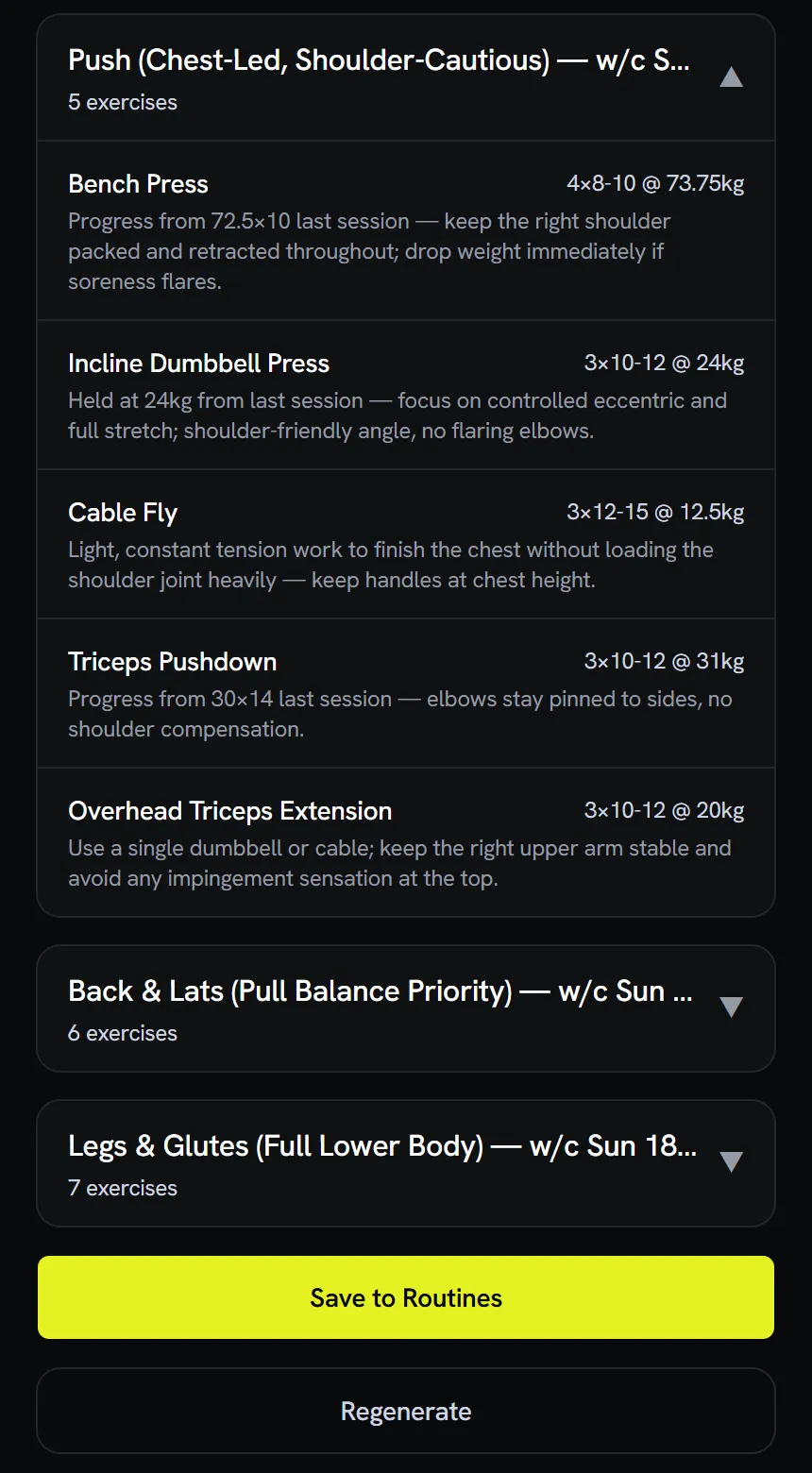
The review covers trend, consistency, most improved lift, plateaus and missed muscle groups. From a weekly review I can ask for next week as two, three or four sessions and give it an objective. Each day is saved as a real routine.
Three smaller features:
- Second opinions. A Validate button critiques a routine for goal fit, muscle balance, order, volume and recovery, with a verdict of accept, accept with minor changes or revise. It only advises and never edits.
- Exercises from a photo or a name. Point the phone at a machine, or type “Reverse EZ Bar Curl”, and it drafts the entry with muscles, equipment and setup cues for me to review.
- Readiness and goals. A daily 1 to 5 readiness check-in nudges suggested weights (1 eases them 10%, 2 eases 5%, 5 adds 2.5%). Goal lifts, such as a bench target, are worked towards whenever that lift is in the session.
Inside the system
I built Gerfit with Claude Code as a mobile-first web app. The front end is React 19 with Vite, TypeScript and Tailwind v4, installable on a phone’s home screen. Supabase provides sign-in, a Postgres database with row level security and the serverless functions, and Cloudflare Pages hosts the app. The Claude API is reached only through seven small server-side functions.
| Layer | What I used |
|---|---|
| Interface | React 19, Vite, TypeScript, Tailwind v4, installable web app |
| Backend | Supabase Edge Functions (seven), one per AI feature |
| Data | Supabase Postgres, row level security on every user-owned table |
| Auth | Supabase sign-in, plus an allowlist checked inside each AI function |
| Runtime AI | Claude API, with each function able to use a different model |
| Hosting | Cloudflare Pages |
| Build tooling | Claude Code, working from a product brief, a project log, a decision record and a security document |
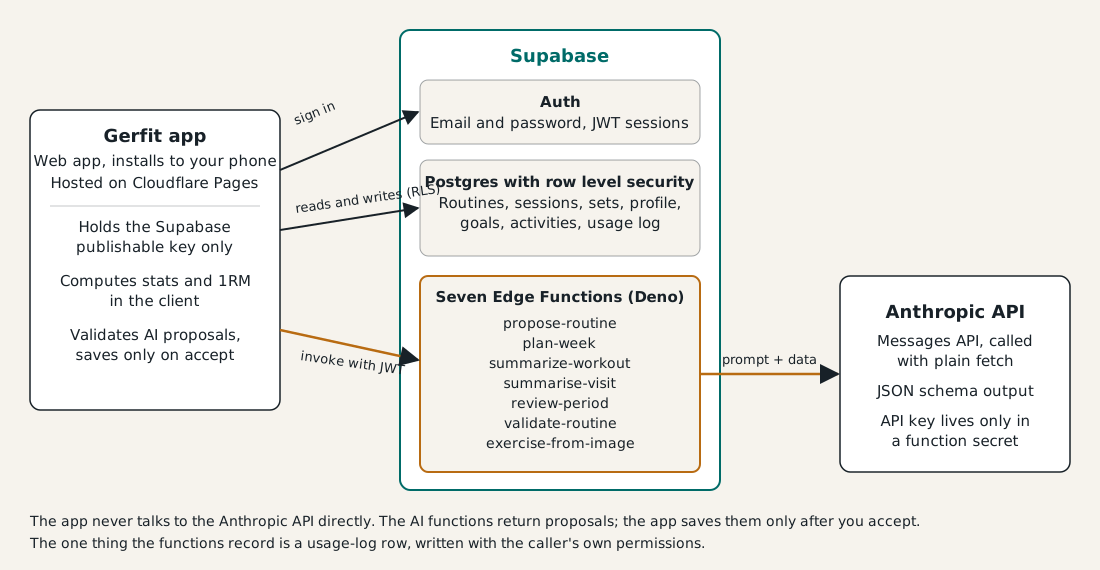
The database decides who sees what whatever the front end does. The functions return proposals and the app saves them only after I accept. The one thing a function records is a usage-log row, written with the caller’s own permissions. Sign-ups are open and a valid login alone would not limit spend, so each function also checks the caller against an allowlist before it spends a token.
I built it in a deliberately boring order: sign-in, schema and row level security, exercise library, routine builder and workout logging all existed before the first AI call. The AI features plugged into data that was already solid.
Teaching the AI who I am
The AI never gets a blank prompt. Before every request the app assembles a compact picture of me and sends it along: my exercise library as a numbered list, the last session and best set for each exercise (“last 80 kg for 8, 3 days ago”), the number of sets per muscle over the past three weeks and how recently each was hit, activities from the last ten days, my profile, my active injuries, my goal lifts and the equipment at my gym. The app does the arithmetic and the model does the judgement.
Build decision. The model’s answer has to match a JSON schema, so the app receives a structured routine, not a paragraph to parse. Each exercise comes back as a number that the app maps to a real exercise, and anything that does not exist is thrown away.
When the builder once under-picked bench press from the long list, I traced it to the prompt, not the data, and fixed it with an instruction to build around the main barbell lifts when they fit. Knowing which of the two you are debugging saves a lot of time.
Making it cheap enough to use every day
I measured what each AI call costs and then cut the expensive one. A cold routine build was the outlier at about 7.4 cents on Sonnet, because it shipped the whole library of around 870 exercises. Day summaries and photo scans were each under one and a half cents.
Build decision. I added a filter that reads the request (“chest day”) and sends only the muscles it implies, falling back to the full library for broad or unclear requests. A chest-day payload dropped from about 17,400 tokens to about 3,700, which cut a build to roughly 2.1 cents.
Prompt caching went in as well. It cuts both ways, because a cache write costs more than a normal read, so it only pays off if you refine the routine within five minutes. A per-user usage log and a monthly cap give me a ceiling, and each function can run on a different model so summaries can sit on a cheaper one.
Replacing the exercise library under real data
My first library came from a public exercise database and held more than 1,100 rows, with near-duplicates and the same movement tagged differently. I wanted one clean entry per movement while my training history still pointed at the old rows.
Build decision. I replaced the library with a smaller dataset (302 exercises, one per movement) and remapped my history onto it instead of merging both lists. The matcher compared names, then equipment. It remapped 105 of the 358 exercises I had actually used and left 253 as untouched legacy rows rather than guess. “Barbell Shoulder Press” and “Machine Shoulder Press” stayed separate.
An equipment check removed false merges such as “Cable Curl” to “Barbell Curl”, and I re-audited the whole list in code. A duplicate-key failure on the live run was fixed by switching those tables to insert-with-conflict-skip. The migration ran as one transaction, so the failed attempt rolled back cleanly, and afterwards I checked that the logged set count was unchanged and that no row pointed at a missing exercise. I also brought in my years of history from Jefit, the paid app I used before. The importer matches exercise names conservatively, previews the result, skips days already imported and can be undone, and I proved the file format against a real export.
Design and supply-chain choices
The look came from a deliberate design pass. I picked Linear’s style, then found its muted grey fails accessibility contrast, so I lifted it to a contrast ratio of 7:1, because a bright gym is a worse place to read a phone than a quiet desk. On the supply-chain side, I tested my npm cooldown setting instead of assuming it worked. min-release-age turned out to be a pnpm setting that npm ignores, so I switched to npm’s --before flag, which covers the whole dependency tree, and confirmed it by watching it refuse a package version published two days earlier.
What Gerfit shows
Gerfit covers the whole loop of training: logging, routines, injuries, day recaps, weekly reviews and weekly plans, all drawing on the same personal data. The pattern I would reuse anywhere is the one at the centre of the app: let the AI propose and let the application save, so a bad answer can only ever produce a discarded draft.
The live app is at gerfit.pages.dev.