Work / App Prototype
Freedom Dashboard: a retirement plan I can recalculate
Freedom Dashboard is a retirement-planning dashboard I built with Claude Code and Codex. Change a balance, a rent or an assumption and its readiness checks, savings projection, rental tax model and drawdown scenarios recalculate at once. A demo mode on invented data cannot overwrite a real saved plan.
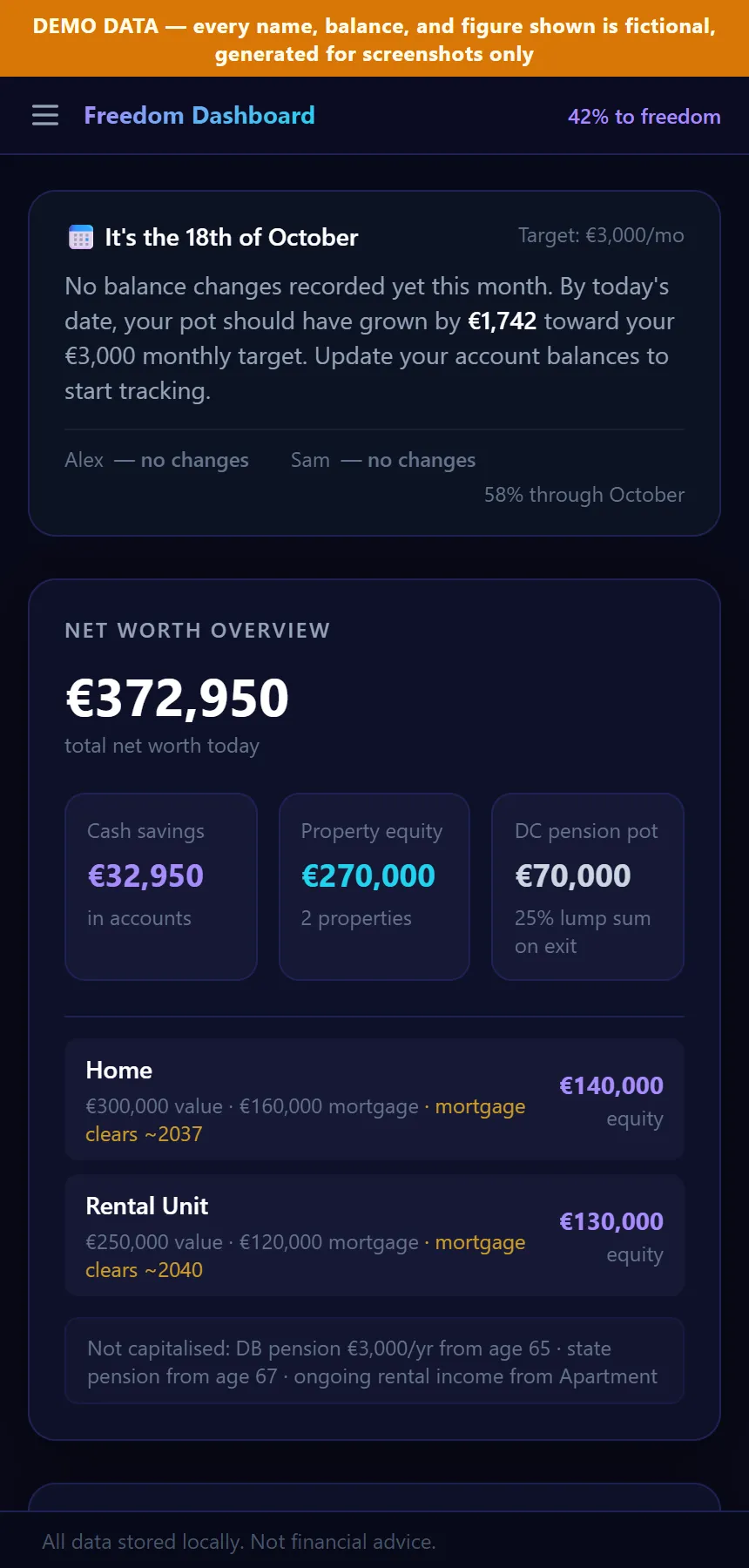
Demonstration data. Invented data.
Change one savings balance in Freedom Dashboard and the plan answers back straight away: the progress bar moves, the month’s pace against target updates, and the “savings projection” check says whether the cash target is still reachable by the date I chose. Every figure in this article comes from an invented couple, Alex and Sam, because the real dashboard holds my own finances.
At a glance
- Status: Prototype. It runs locally on one computer.
- Platform: a web app in the browser, served by a local development server.
- Stack: React, TypeScript, Vite, Tailwind CSS and Recharts, with Node’s built-in test runner.
- Built with: Claude Code and Codex.
- AI inside the product: yes, one feature: an AI Advisor tab that sends your questions and a snapshot of the plan to Claude (the code names Claude Sonnet 4.6).
Change a number, watch the plan move
Text version of the video
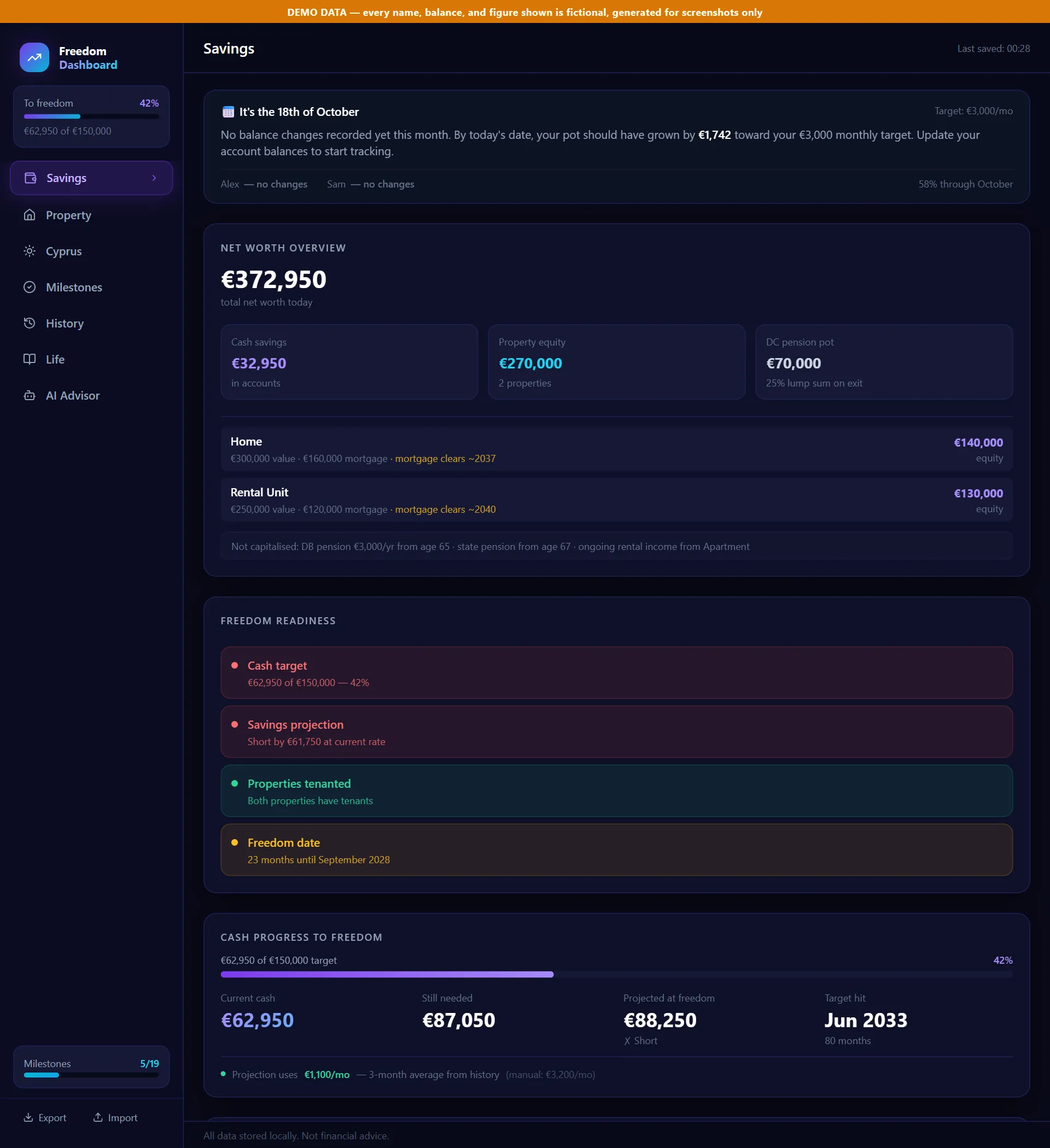
- The Savings tab for Alex and Sam: net worth, four readiness checks, progress to the cash target.
- Scrolling down to the account balances. Alex's everyday savings account is retyped from 12,250 to 16,250 euros, and the "to freedom" progress in the sidebar rises from 42% to 45%.
- The Property tab, which lays out each property's monthly cash flow and annual tax return line by line.
- The destination tab: the Bear scenario is selected, then the drawdown rate is changed to 8%. The income summary at the top updates.
- The History tab, where the balance change appears as October's bar against the monthly target line.
The dashboard answers one question: how close is the couple to being able to stop working? It has seven tabs.
Savings holds each person’s accounts. Cash accounts record every change at once. Investment accounts take a separate “new money added” box, so a market move is not counted as saving. Four readiness checks turn the numbers into red, amber or green: cash against target (green from 90%), a projection of cash at the freedom date, whether both properties are let, and the time left. The projection uses the average of the last three completed months from the history when there is one, and a manual monthly figure otherwise.
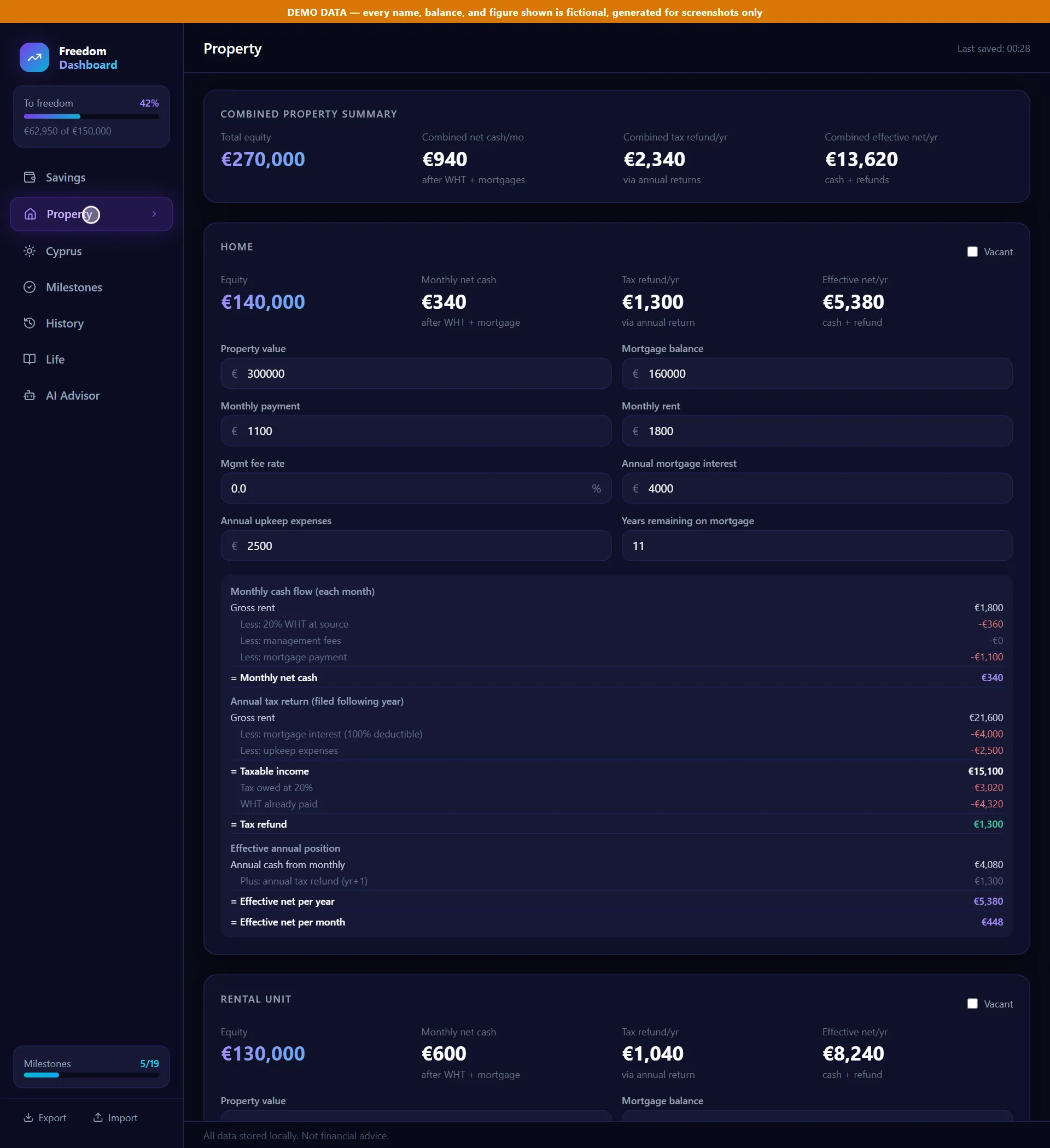
Property models each rental the way the code assumes a non-resident landlord is taxed: 20% withheld on gross rent each month, then an annual return that deducts mortgage interest and upkeep and refunds any difference. The calculation sits in one file, shared by the Property tab, the drawdown tab and the AI Advisor, so the three cannot disagree about rental income.
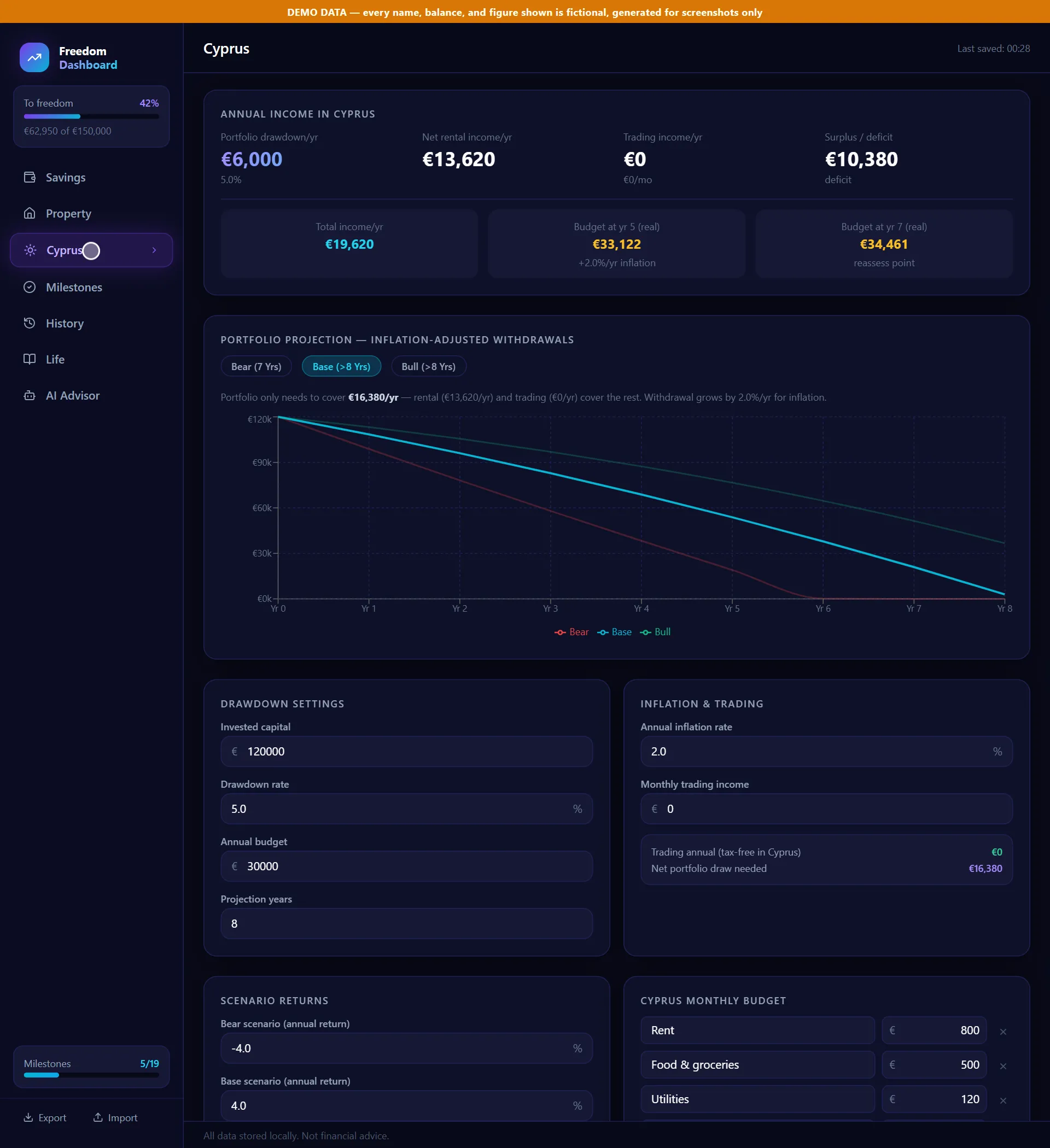
The destination tab takes a monthly budget, an invested pot and three return assumptions. The portfolio only has to cover the budget that rent and any trading income do not, and that withdrawal rises with inflation each year. The buttons show how many years each scenario lasts.
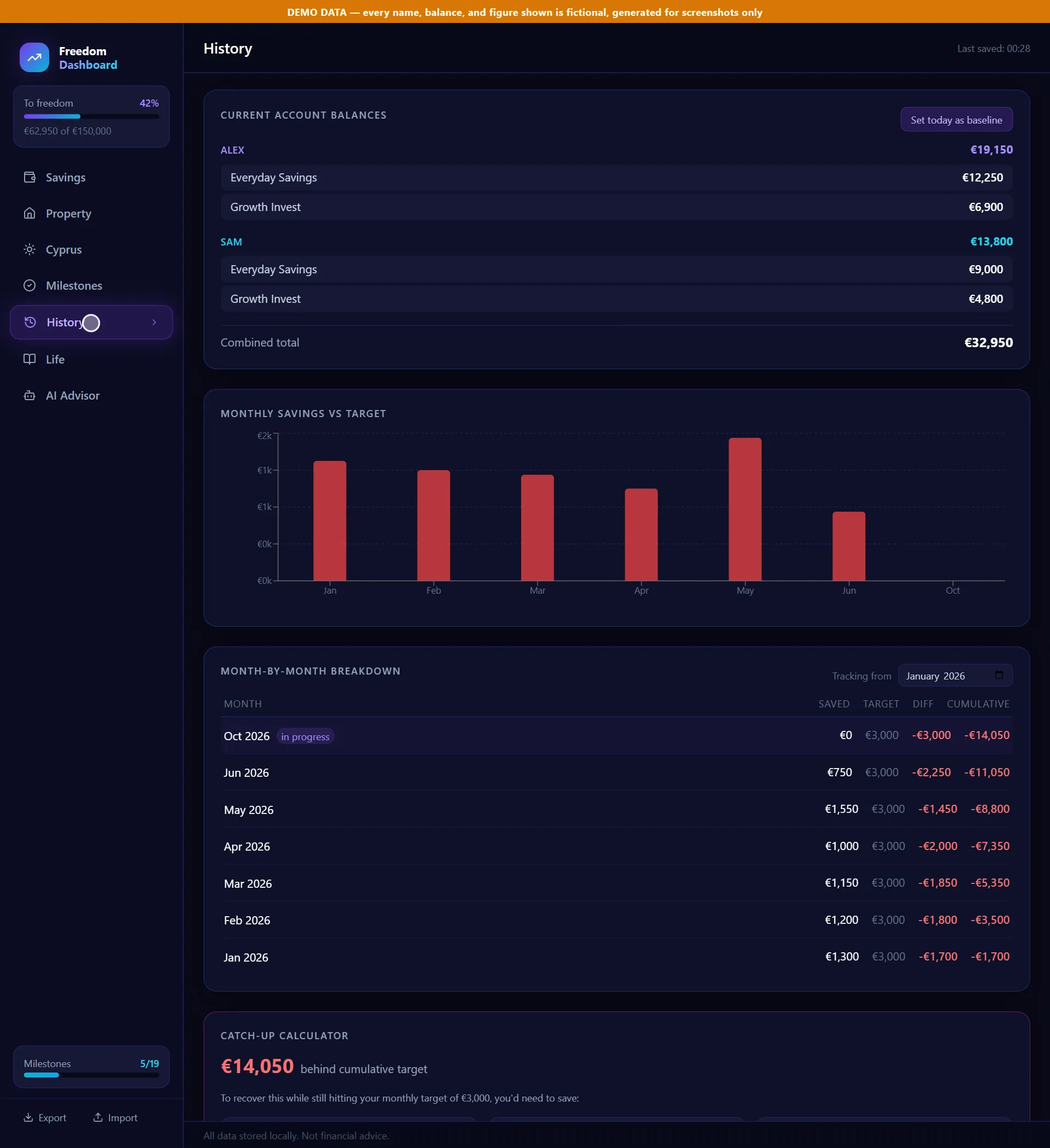
History logs every balance change and compares each month’s saving with the target. If the cumulative total is behind, a catch-up calculator spreads the shortfall over one, three or six months on top of the usual target. Milestones is a checklist of 19 steps including a tax and admin transition list, and Life holds a manifesto and a journal. Export and Import move the whole plan in and out as a JSON backup.
Protecting real data
Build decision. Demo mode. Opening the app with
?demo=1swaps in a fixed, fictional state, shows the orange banner and switches off every write path: browser storage, the saved-state file on disk and the sync that would pull real data in. The reason is written beside the code: otherwise a demo session could silently overwrite the real saved plan. Tests check that saving and syncing do nothing in demo mode.
Build decision. Local only, enforced twice. A review found that the
npm run devscript passed a--hostflag that overrode the safe server setting, which exposed the app to the network, and that the state endpoint accepted requests from any web page. The fix binds the server to the loopback address and also rejects any request whose Host or Origin header is not localhost, 127.0.0.1 or [::1]. The recorded reason: one command-line flag had already defeated the first control once, so the second one has to hold on its own. The tests send a forged Origin and a forged Host to both endpoints and expect a 403 each time.
The AI Advisor
The advisor tab is a chat box. Each question goes to a small endpoint on the local server, which adds the API key from a local environment file and forwards the request, so the key never reaches the browser. The system prompt tells the model it is not a regulated adviser and then embeds a text snapshot of the whole plan.
This is the start of the request the tab builds, using the invented couple’s figures:
You are a personal financial planning assistant for the Freedom Dashboard.
You help Alex and Sam plan their relocation and career break.
You are NOT a regulated financial adviser - always clarify this is planning support only.
Be concise, practical, and use euro figures. Here is their current financial snapshot:

FREEDOM DASHBOARD - FINANCIAL SNAPSHOT

SAVINGS PROGRESS
Current cash: €62,950 of €150,000 target
Monthly saving rate: €3,200/month
Freedom target date: 2028-09-01

[properties section omitted]

CYPRUS DRAWDOWN MODEL
Invested capital: €120,000
Drawdown rate: 5.0% = €6,000/year
Annual budget: €30,000
Total projected income: €19,620/year
Scenario returns: bear -4.0%, base 4.0%, bull 8.0%

[pensions, milestones and closing context omitted]
Figure 6. The opening of an Advisor request on invented data: the instructions given to the model, then a text snapshot of the plan that grounds its answers. The code names the model as claude-sonnet-4-6 with a 1,024-token limit.
Under the hood
I built Freedom Dashboard with Claude Code and Codex as a single-page React and TypeScript app, designed around what it calculates and what it must never do with real data.
The app is a single-page React app. One state object holds everything, and each tab calculates its figures from it in the browser. The only server code is a small Vite development-server plugin with two routes: one reads and writes a single JSON state file, and one forwards advisor questions. A browser call to a public exchange-rate service converts USD accounts.
| Layer | What I used |
|---|---|
| Interface | React, TypeScript, Vite, Tailwind CSS, Recharts |
| Logic | Calculations in the browser from one state object; the rental tax model sits in one shared file |
| Backend | A small Vite development-server plugin with two routes: state file and advisor |
| Data | One JSON state file on disk, plus JSON export and import |
| Integrations | Anthropic API (via the local server) and a public exchange-rate service |
| Runtime AI | Claude Sonnet 4.6 as named in the code, in the Advisor tab only |
| Hosting | None: it runs locally on one computer |
| Tests | Node’s built-in test runner, 18 tests, all passing |
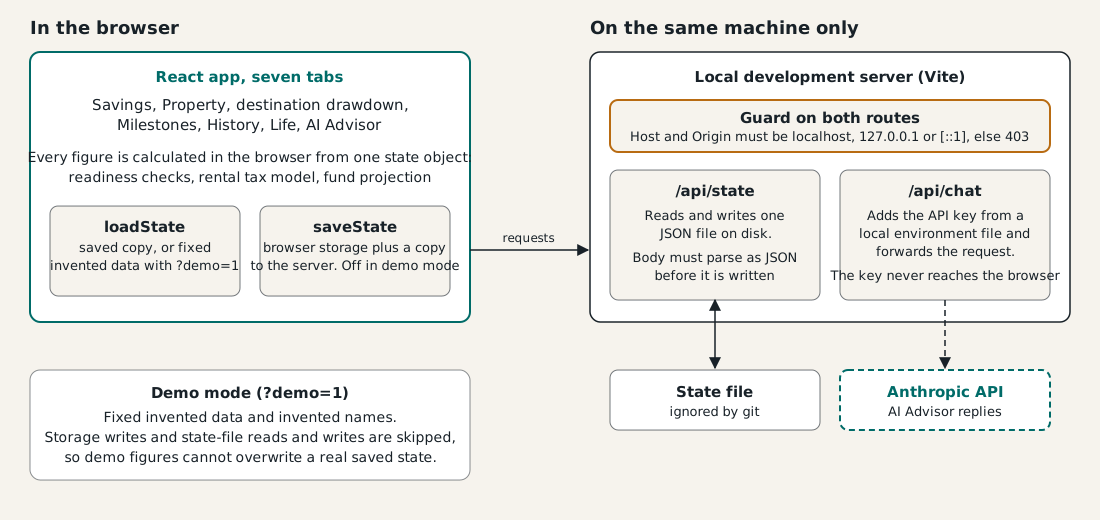
The 18 tests cover the local-only guard, demo-mode write blocking and the migration of old saved data.
What it shows
Everything on screen is arithmetic over assumptions I type in. It shows the shape of a plan rather than forecasting one. What I am pleased with is the discipline around it: a demo mode that cannot write, a server that holds its boundary even if a flag fails, and one shared calculation for rental income. Together they make a personal finance tool I can change freely and open with confidence.