Work / App Prototype
DwellOS: one local file for a rental apartment
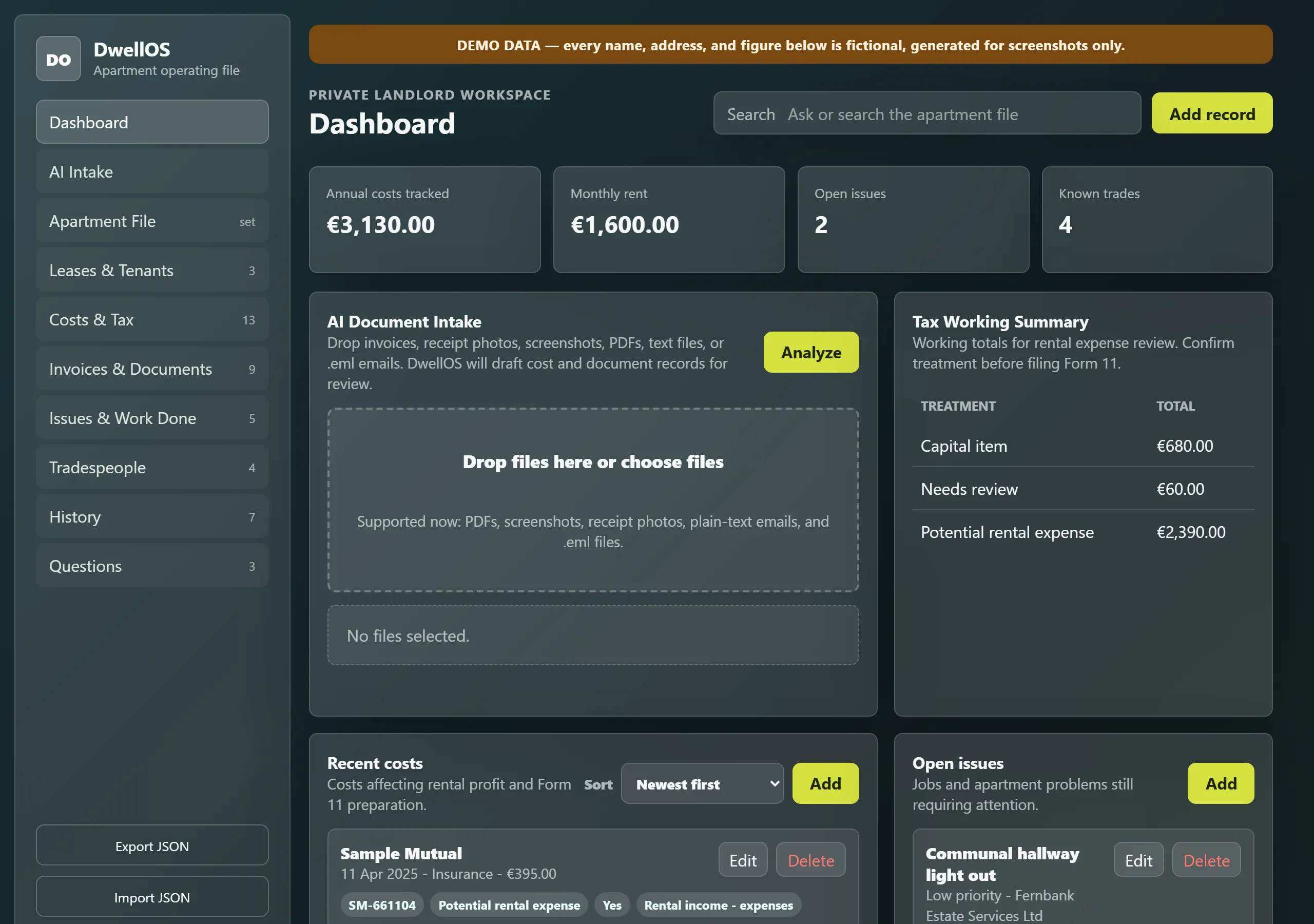
DwellOS is a browser app that keeps one rental apartment's leases, costs, tax categories, documents, repairs and tradespeople in a single local file. It flags likely duplicate invoices, and an optional AI Intake step drafts records from a dropped invoice for me to check before anything is saved.
Demonstration data. Invented data.
I type a supplier, an invoice number and an amount, press Save, and DwellOS tells me I have already entered that invoice. That one check is the point of the app: leases, invoices, repairs and tax categories in one place, so a year’s costs are already sorted when the tax return is due.
At a glance
- Status: Prototype. It tracks one apartment.
- Platform: a web page you open from disk. There is no server and no build step.
- Stack: plain JavaScript, HTML and CSS, with the browser’s local storage holding the data.
- Built with: Claude Code and Codex.
- AI inside the product: optional. AI Intake sends a dropped document to the OpenAI API and gets back a draft record. Everything else is ordinary code.
The duplicate check in action
Text version of the video
- The dashboard for an invented apartment, with the demo banner showing.
- Costs & Tax: thirteen invented costs. One management fee is flagged as a possible duplicate of another with the same supplier and amount.
- I add a cost with supplier Harbour Plumbing Ltd, invoice number HP-3391 and amount 185, which an existing record already has.
- The new record is flagged. Further down, the Duplicate Invoice Check card lists each match with the reason, and each has a Not duplicate button. I press one.
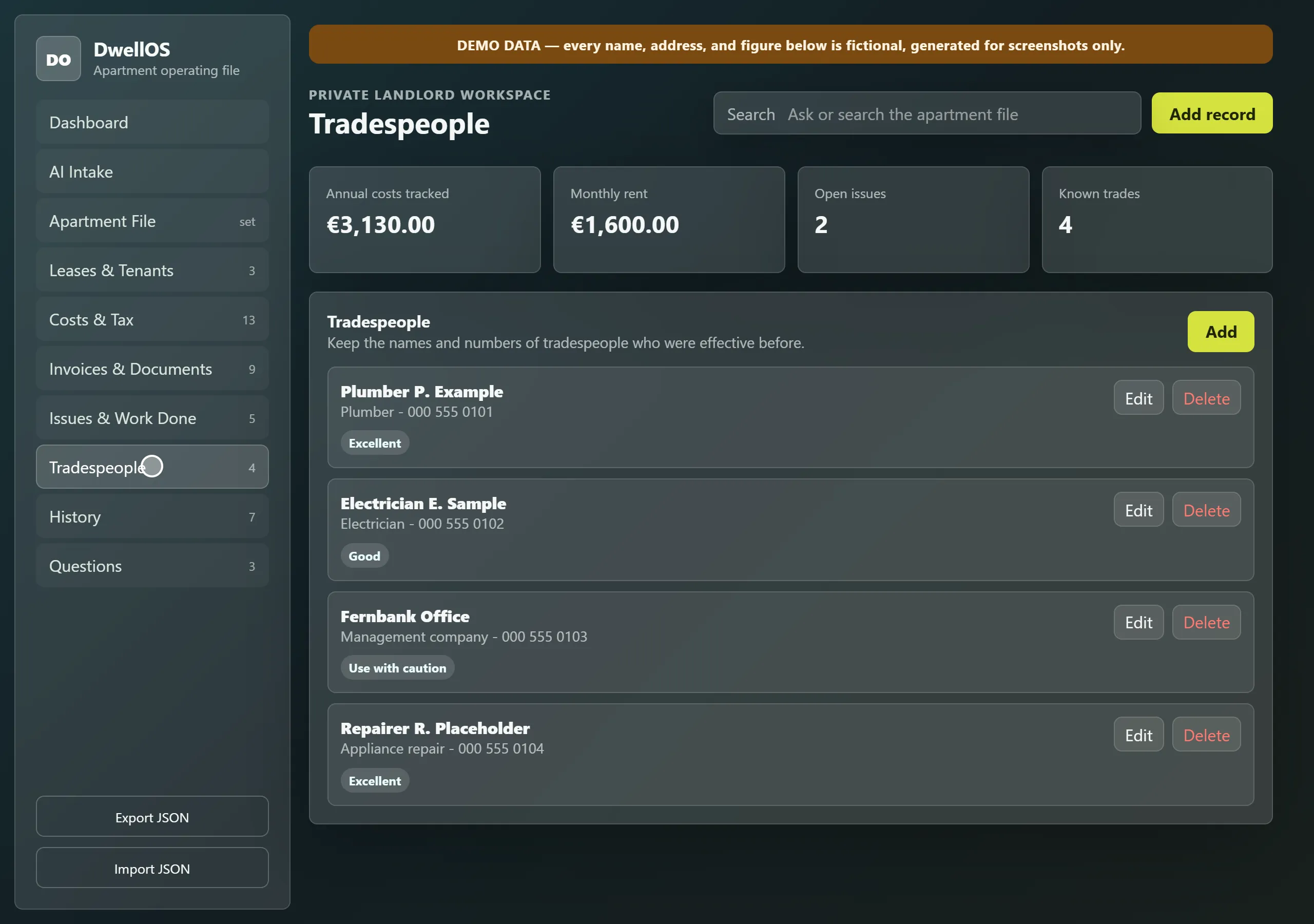
- Leases & Tenants, Tradespeople and the AI Intake screen, which opens ready for a dropped file.
Owning an apartment that someone else lives in produces paper in several places. The lease is in one folder, invoices arrive by email or as a photo of a receipt, a plumber’s number lives in a text thread, and every cost eventually has to be sorted into the categories a tax return wants. DwellOS keeps all of it in one place.
Ten views for one apartment
DwellOS has ten views: a dashboard, AI Intake, the apartment’s permanent facts (meter numbers, energy rating, management company, insurance), leases and tenants, costs and tax, invoices and documents, issues and work done, tradespeople, a history timeline and a place for questions I keep having to look up.
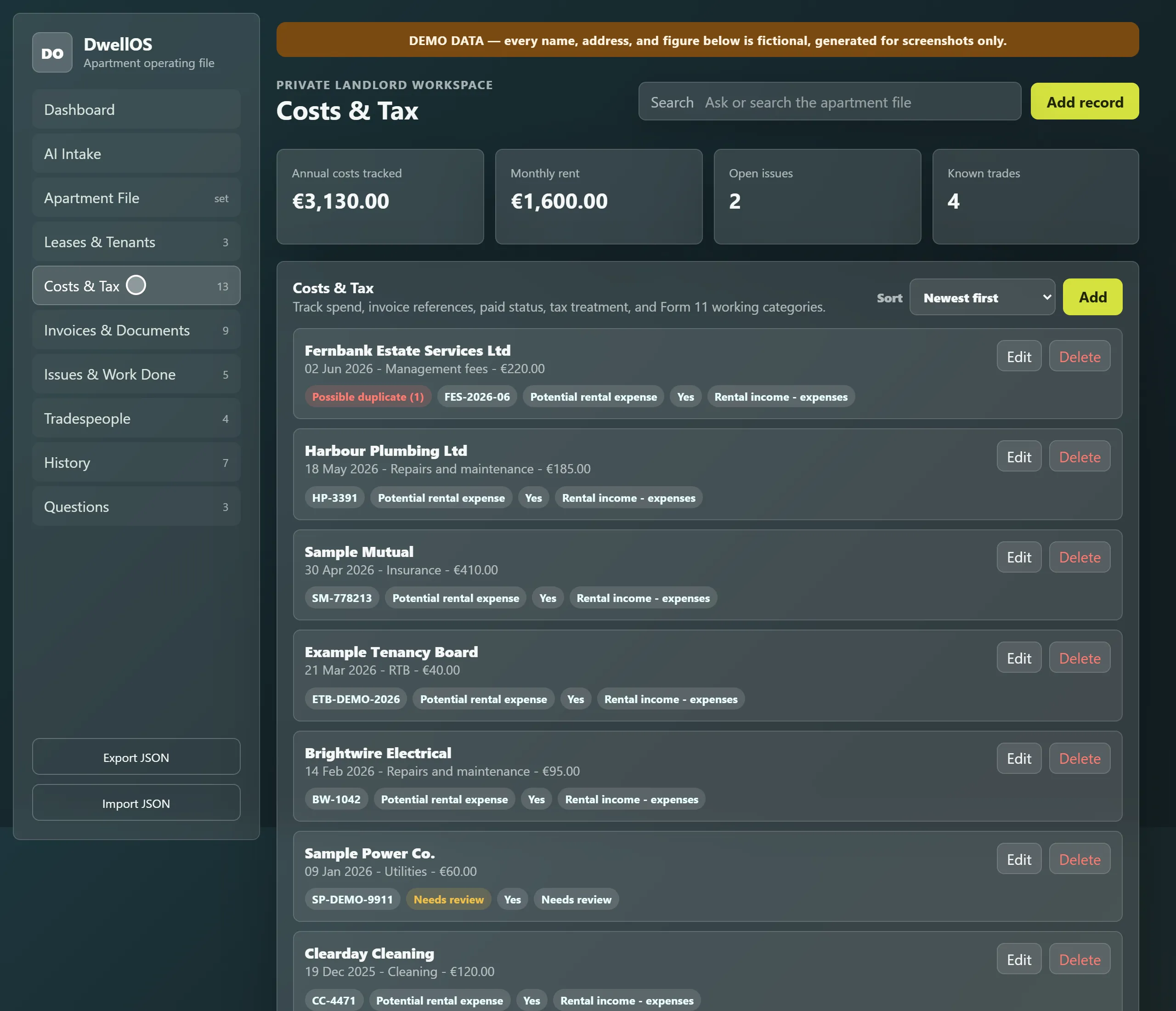
The tax fields are working papers, not advice: the app says to confirm treatment before filing. A cost I am unsure about can be marked Needs review, which is an option in its own right rather than a guess made at data entry.
Documents are indexed by where the file lives, not stored inside the app. The user guide suggests keeping the PDFs in ordinary folders, with the app holding the pointer.
Catching duplicate invoices
The same invoice reaches me twice easily: once by email, once as a photo of the paper copy. The check flags two records when the invoice number and the amount both match, or when the supplier and the amount both match. The amount must always match, because a supplier appearing twice is normal and a supplier appearing twice with the same amount is worth a look.
Build decision. The check flags and a person decides. Each flag has a Not duplicate button, and the answer is saved against that pair so it is not raised again. In the demo data, a quarterly management fee of the same amount is flagged against the previous quarter, which is exactly the case the button exists for.
Keeping the data on my own machine
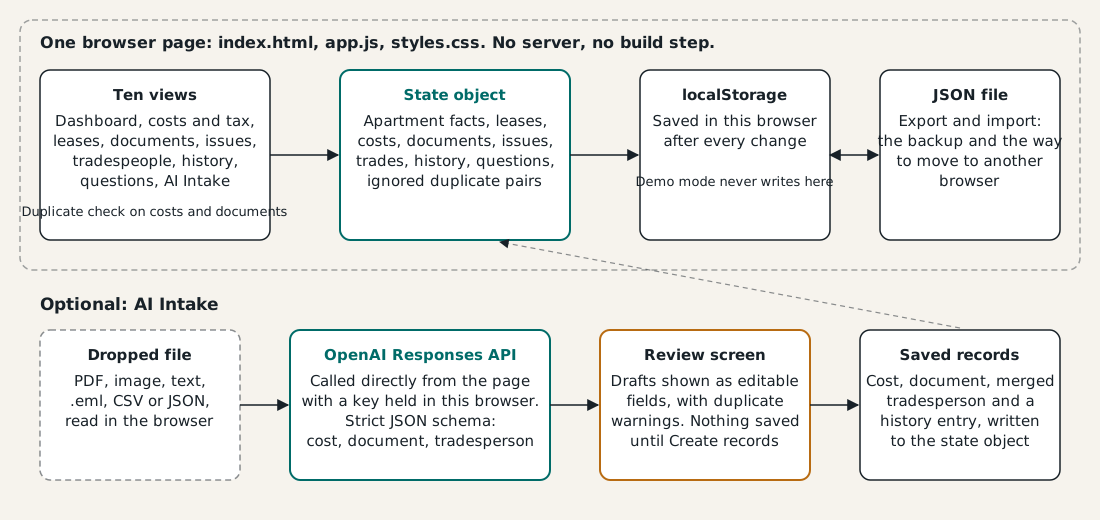
I wanted the operating file for my apartment to sit on my own machine, not in someone’s subscription. So the whole thing runs in one page, saves to the browser’s local storage after every change, and uses a JSON export and import as the backup and the way to move between browsers.
AI Intake: a draft, not a record
Typing every invoice in is the dull part. AI Intake takes a dropped PDF, receipt photo, screenshot, text file or .eml email and asks the OpenAI API for one draft: a cost, a document entry and any tradesperson details. The model’s default name in the settings box is gpt-4.1. The request uses a strict JSON schema, so the reply has to fit the fields, with a fixed list of tax treatments that includes Needs review. The system prompt asks for conservative tax classifications and tells the model not to invent missing details. That is an instruction, not a guarantee.
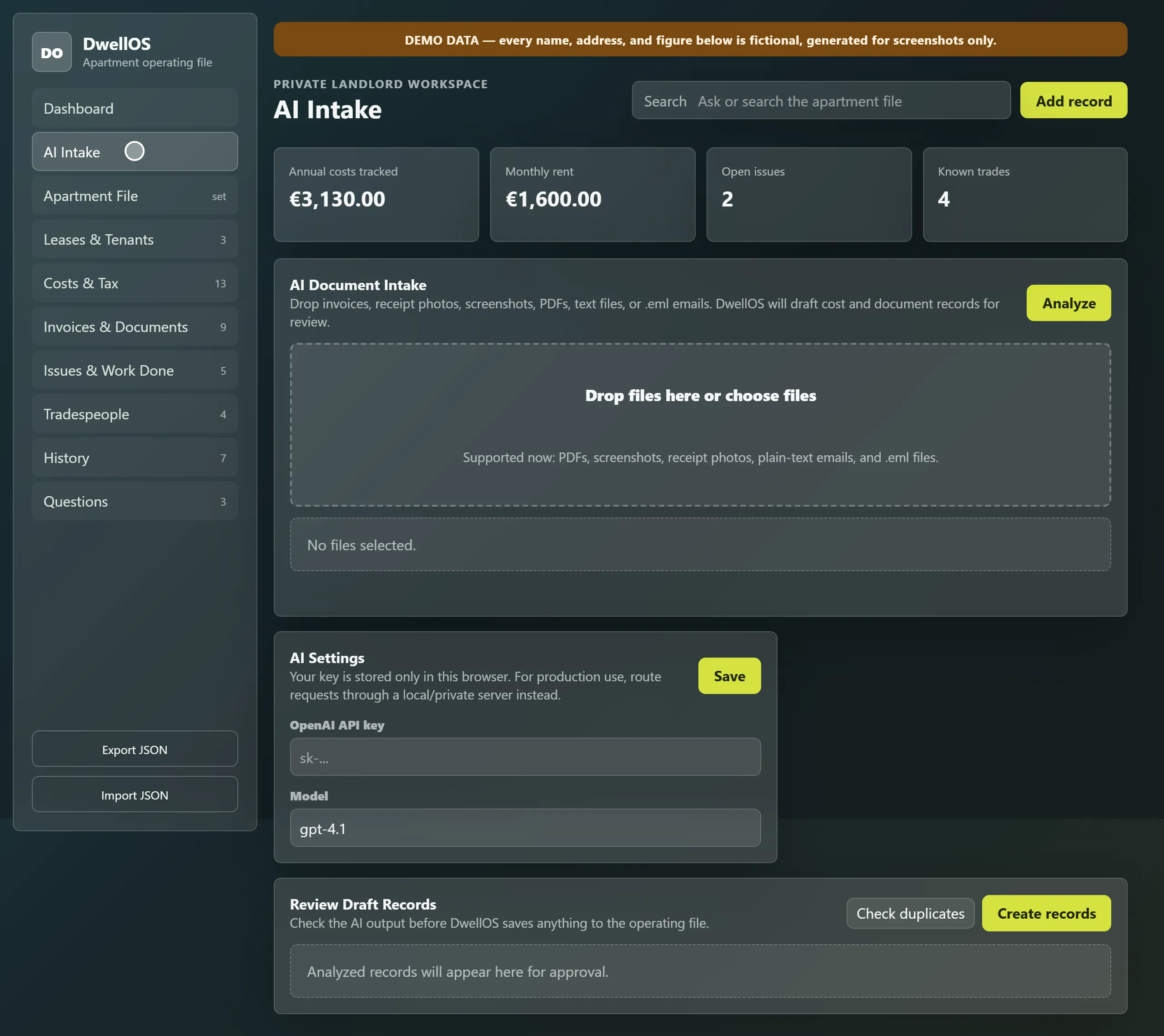
The reply does not become records. It appears on a review screen as editable fields, with duplicate warnings, and nothing is saved until I press Create records. On saving, the app also merges a tradesperson into an existing entry when the email, phone number or name matches, and adds a history entry saying the record came from AI.
Under the hood
I built DwellOS with Claude Code and Codex as a single-page JavaScript application: about 1,500 lines in one file, plus a page and a stylesheet. The duplicate rules and the choice to keep everything local are the design at its core.
| Layer | What I used |
|---|---|
| Interface | One HTML page with ten views, plain CSS |
| Language and runtime | Plain JavaScript, about 1,500 lines in one file, running in the browser from disk |
| Backend | None: no server and no build step |
| Data | One state object saved to the browser’s local storage after every change, with JSON export and import as backup |
| Integrations | Optional: the OpenAI Responses API for AI Intake |
| Runtime AI | OpenAI (default model name gpt-4.1 in settings) for draft records only, behind a review screen |
| Hosting | None: opened from disk |
| Runtime environment | Any modern browser, opened from a local file |
What it shows
A useful record keeper does not need a server. One file of plain JavaScript, a state object in local storage and a JSON backup hold an apartment’s leases, costs, documents and tradespeople, and the one check I wanted, duplicate invoices, is a few lines of rules with a person making the final call. DwellOS shows how far a single local file can go for a real-world admin job: an apartment’s paperwork sorted for tax as it arrives, with AI doing the typing and a person making each decision.