Work / Tool Prototype
Project Monitor: a dashboard that checks what my projects claim
Project Monitor is a local dashboard for projects built with Claude Code. It shows tasks, roadmap, tests and Git state, and checks the status each project declares against its commit history, flagging a task marked complete that no code change supports. It is read-only and runs on localhost.
Demonstration data. Invented data.
One of my demo projects says it is 100% complete. Its dashboard card says so too, in a confident green bar. Project Monitor then points out that the “offline cache” task behind that figure has no code change supporting it, that the recorded test results are older than the latest source commit, and that the activity log has been quiet for three days. That is the point of the tool. I run many projects with Claude Code, and a status page that only repeats what a project says about itself cannot tell me when the claim has drifted from the code.
At a glance
- Status: Prototype.
- Built: 17 August to 3 October 2026, 86 commits.
- Platform: a Node.js service and a browser page, bound to localhost.
- Stack: Node 22 or later, Express, simple-git, Ajv for JSON Schema validation, plain JavaScript in the browser with no build step.
- Built with: Claude Code.
- AI inside the product: no. The monitor makes no AI calls. Claude Code is the tool that writes the status files it reads.
Three projects, three verdicts
Text version of the video
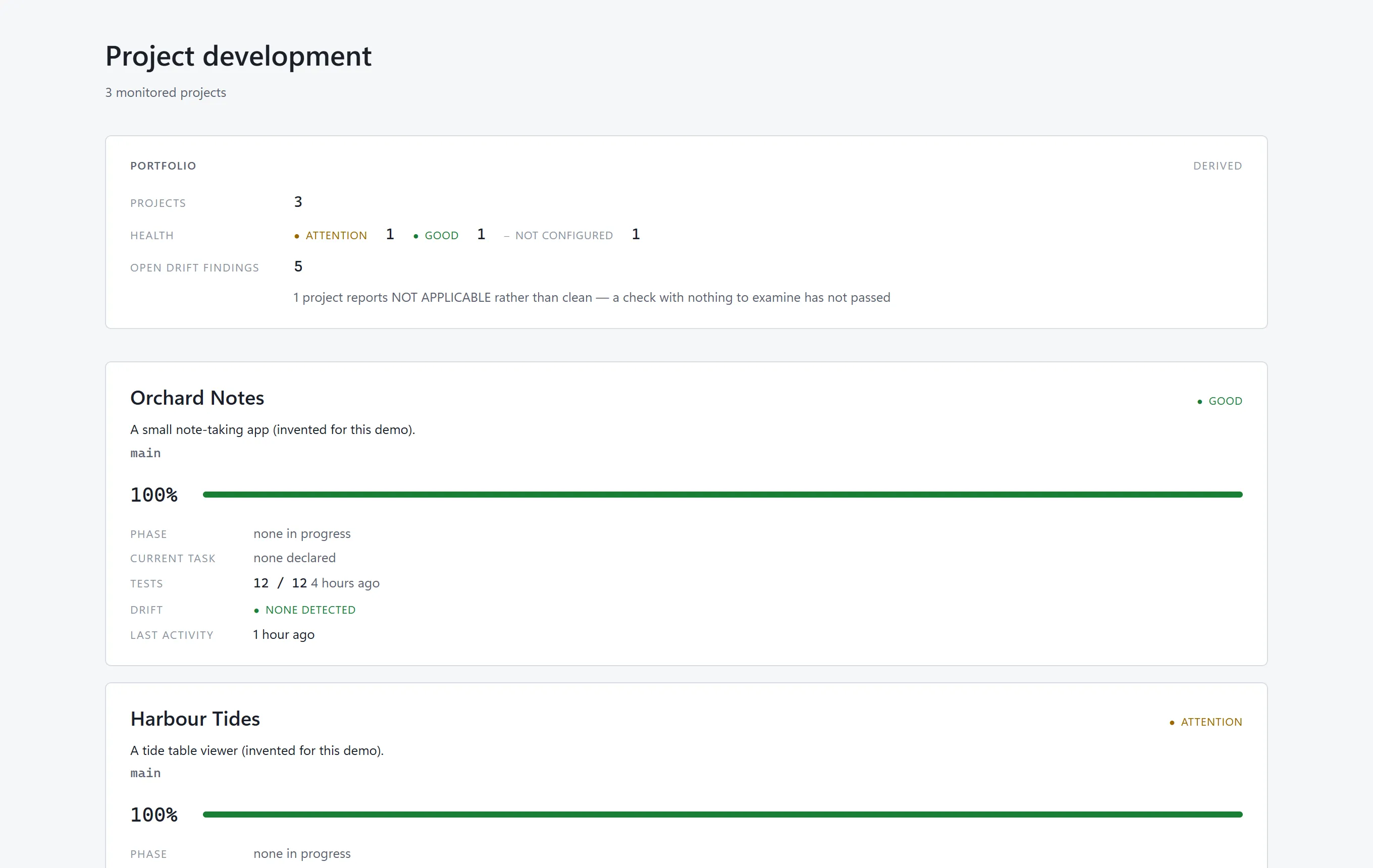
- The portfolio page lists Orchard Notes (Good), Harbour Tides (Attention) and Ledger Lite (Not configured), with a count of open drift findings.
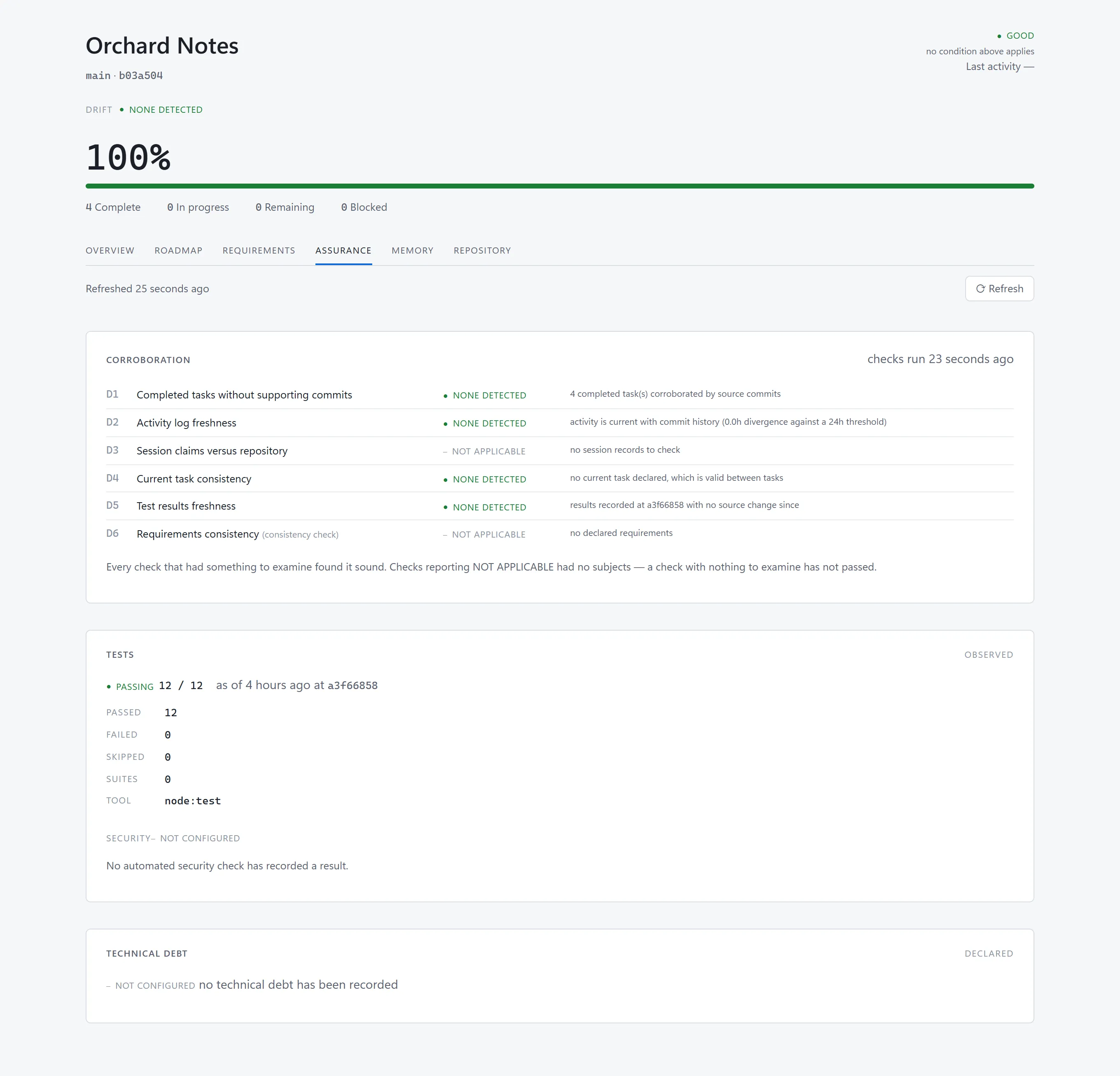
- Orchard Notes: the overview, then the Assurance tab. The checks that had something to examine report none detected. The two with nothing to examine report not applicable.
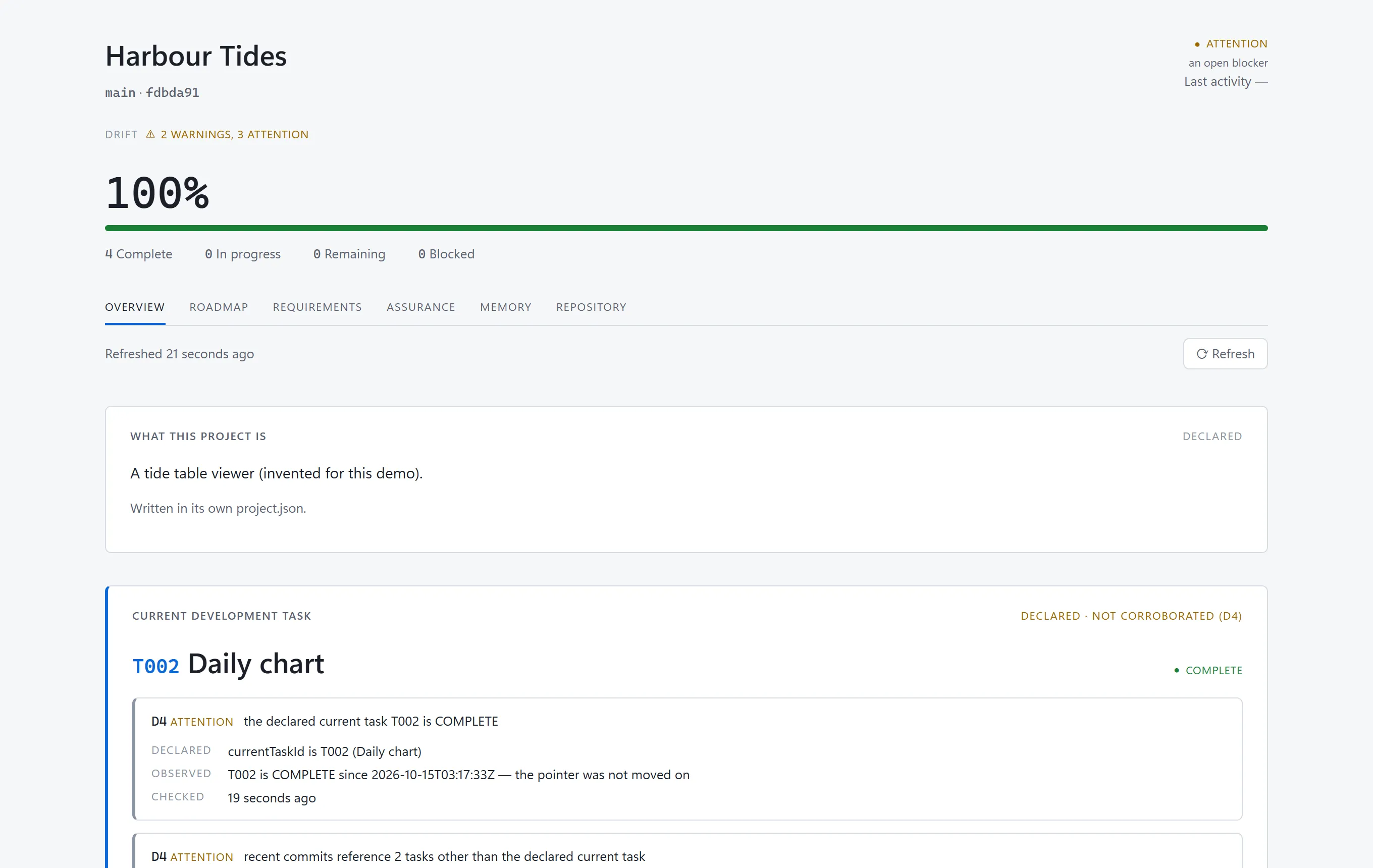
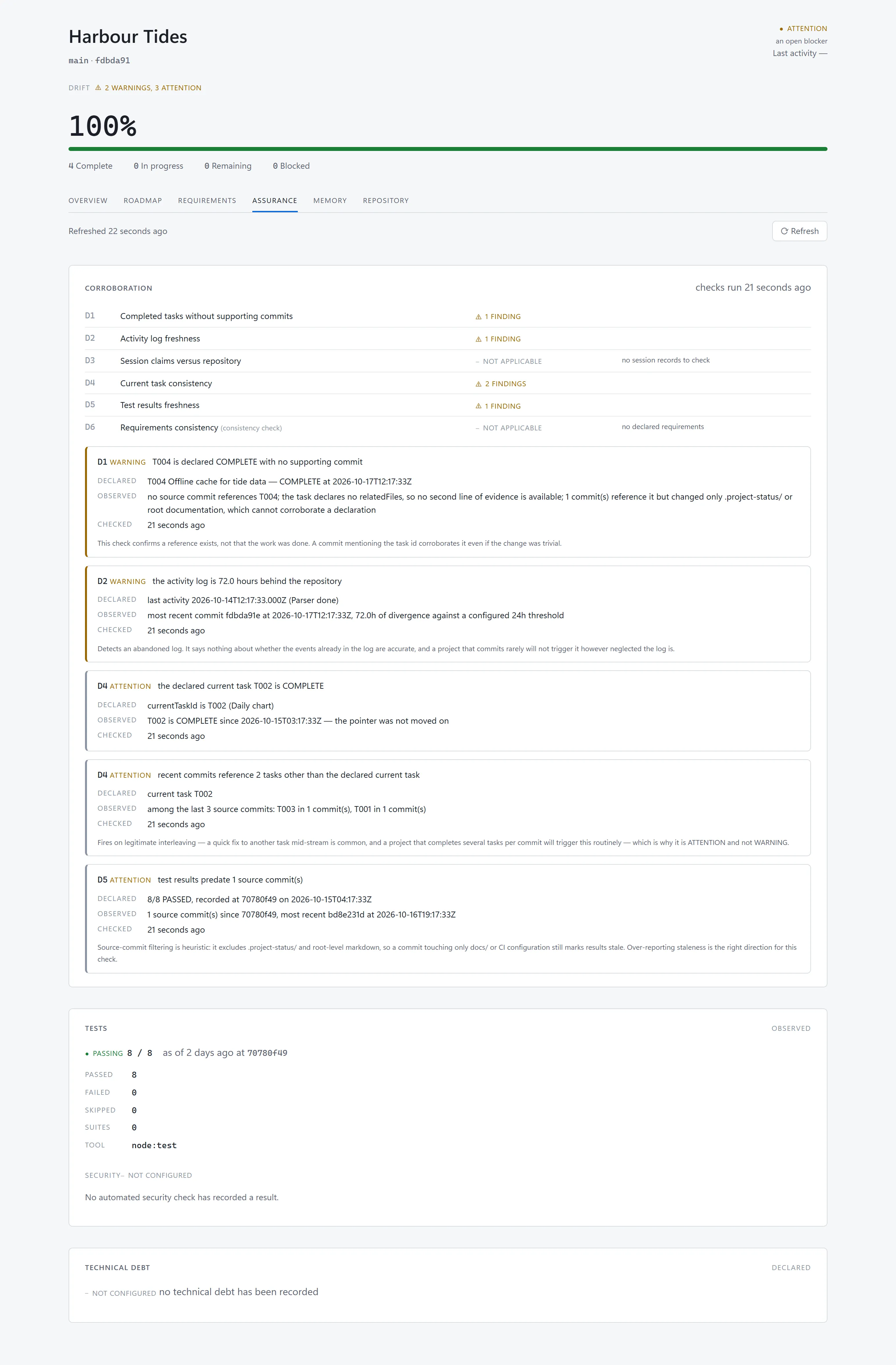
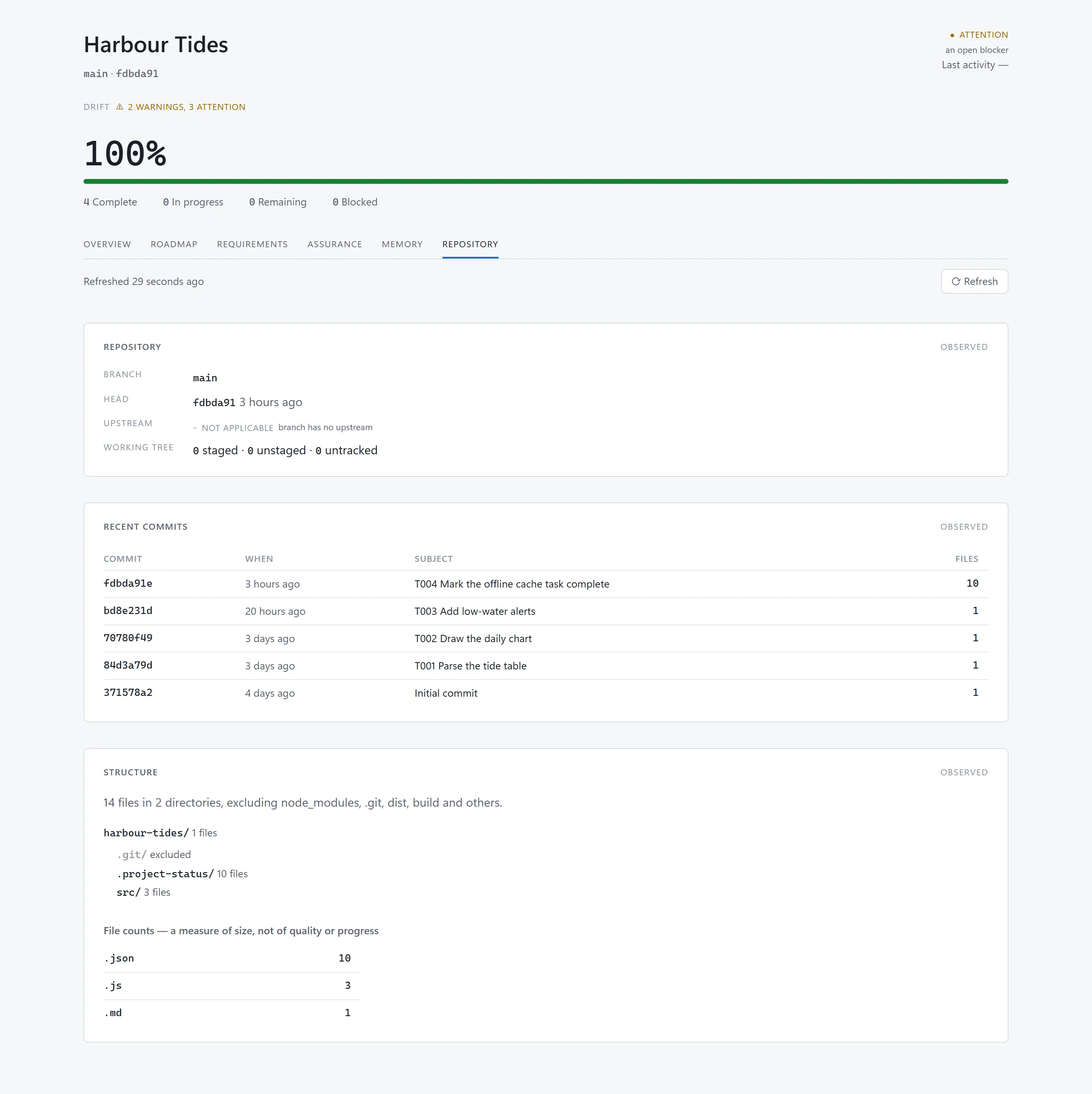
- Harbour Tides: the overview declares 100% complete, yet the current task is flagged as not corroborated. The Assurance tab lists five findings, each with what was declared, what was observed and when it was checked.
- The Repository tab shows the commits behind those findings.
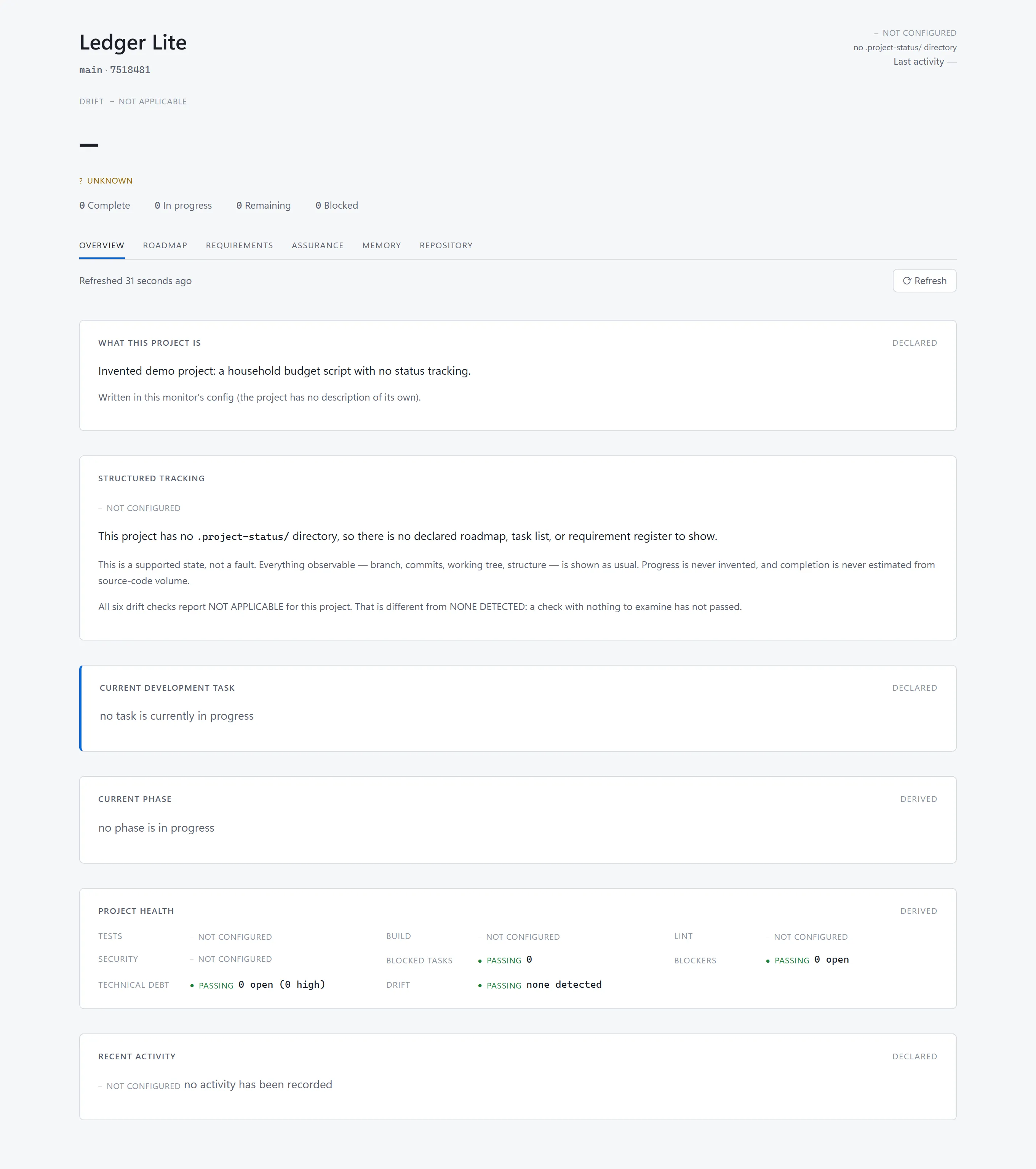
- Ledger Lite has no status directory. The overview says so plainly and reports all six checks as not applicable.
When several projects are built by AI sessions, the record of progress is written by the same sessions that do the work. Tasks get ticked without a matching commit. Activity logs go stale. A session summary says more than the repository can show. Project Monitor is one local page that answers three questions for every project: what is happening, what is finished, and whether the first two answers agree with Git.
Observed, declared, derived
Every value on screen carries one of three labels. Observed means it came from the repository, Git or the session transcripts, so nobody had to assert it. Declared means it was written into the project’s .project-status/ folder, so it is a claim. Derived means the monitor computed it by a fixed rule. A declared value that fails a cross-check is flagged where it appears instead of being shown as fact.
The cross-checks are six drift checks that run on every refresh:
- D1 finds completed tasks with no supporting source commit.
- D2 finds an activity log that has fallen behind the commit history.
- D3 compares session claims with the repository.
- D4 checks that the declared current task is consistent with recent commits.
- D5 finds test results older than the code they describe.
- D6 checks requirements against tasks. It is labelled a consistency check, not corroboration, because both of its inputs are declared.
Here is the clean case. Orchard Notes is an invented project whose tasks, commits and recorded test run all agree.
Now the drifting case. Harbour Tides declares every task complete.
The Assurance tab then shows each finding in the same shape: what was declared, what was observed, and when the check ran.
The Repository tab shows the commits underneath, so I can see the evidence rather than take a finding on trust.
A project with no status folder at all is a supported state too.
A declaration cannot vouch for itself
The first version of D1 accepted any commit message that named a task. Then I looked at the real history of the monitor’s own build: every commit touched .project-status/, and three of the first six touched nothing else. A task could be “corroborated” by the very commit that declared it complete.
Build decision. D1 now counts only commits that change source files. A commit touching nothing but
.project-status/or root-level documentation corroborates nothing. The decision record says I checked the change against the real history: all fifteen tasks complete at that point were still supported by a source commit, so the fix closed the hole without inventing findings.
The same attitude shaped the display. A progress percentage is never typed in; it is computed from task states by one method, and rounding is clamped so that 100% means everything is finished and 0% means nothing is. A project with nothing to measure shows a dash, not zero.
A read-only boundary with tests behind it
The monitor reads other projects, so the worst thing it could do is change one. I treated that as a design constraint with a test behind it.
Build decision. No module under
server/imports a file-write API orchild_process. The only thing that spawns a process is the Git library, and my adapter allows only read subcommands. Git runs with its hooks redirected to a directory that must never exist, and with optional locks off, so that evengit statusleaves the index alone. One test plants executable hooks in a fixture repository and confirms none fires. Another builds a full snapshot and confirms the monitored project is unchanged afterwards.
Test and build status come only from files the project’s own test process wrote. The monitor never runs a monitored project’s tests, scripts or hooks.
The monitor monitors itself
I built the monitor with Claude Code, task by task against a written plan. The project records 88 tasks, all complete, across eight phases, and 40 decision records. Each task has acceptance criteria, and a task is closed with evidence written next to it.
The monitor was also its own first test subject. It has kept its own .project-status/ since the first commit. The rule I set was that if the drift detector never fired during its own development, the checks should be assumed broken. So the project includes a recorded run where two discrepancies were planted on a scratch branch, one behind a deliberately misleading commit message, and the checks caught both.
Build decision. Six commits referred to the wrong task id. I left them in place and recorded the mislabelling instead of rewriting history, because tidying the record would be exactly the behaviour the tool exists to detect. It also shows the ceiling of D1: it confirms that a reference exists, not that the work matches it.
A second decision record changed its own reasoning. I had assumed hooks that write status mechanically were needed because the AI forgets the protocol over long sessions. Measured against this build, currency did not degrade. What went wrong was accuracy in mechanical fields: 146 timestamps an hour out, one out of order, six wrong task ids. The decision stayed, but its justification changed to accuracy.
Under the hood
| Layer | What I used |
|---|---|
| Interface | Plain JavaScript in the browser, no build step; renderers are pure functions that return HTML strings |
| Runtime | Node.js 22 or later, Express, bound to localhost |
| Git access | simple-git, restricted to read subcommands |
| Validation | Ajv, compiling ten JSON Schemas at start-up |
| Data | Files only: each project’s .project-status/, Git history and session transcripts, read and never written |
| AI | None inside the monitor |
| Tests | 371 tests, 370 passing with one skipped in the recorded run of 3 October 2026 |
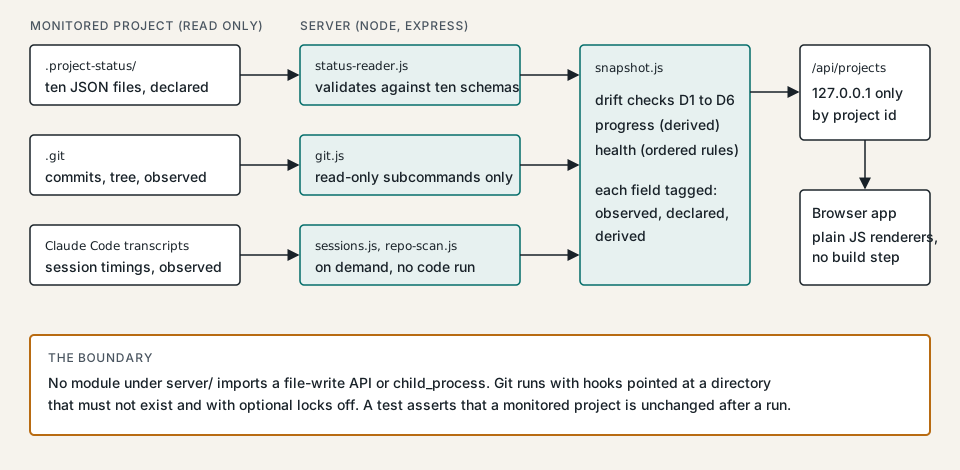
The server compiles all ten JSON Schemas at start-up and refuses to serve if they fail, because a monitor that cannot validate would present malformed status as valid. Each project is addressed by an id from config/projects.json, and no endpoint accepts a filesystem path, so a request cannot name a directory I did not already register. Refresh is by polling, not file watching, and the number of Git processes per refresh is bounded.
Across the three example projects, the clean one comes out Good, the drifting one flags D1, D2, D4 and D5, and the untracked one reports Not configured with all six checks not applicable.
What it shows
Project Monitor puts a second opinion beside every project’s own account of itself. Because the limits of each check sit next to the check, on the same screen, the pages claim no more than a heuristic can show. Corroboration raises the cost of an inaccurate declaration, and the observed, declared and derived labels make it clear which numbers are evidence and which are claims. It gives me one local page to see what is happening across my Claude Code projects and whether the record matches the code.